





 Laptop Computers
 Desktop Computers
 Printers

 Network
 Software
 Laptop Accessories
 Laptop Components
 Office
 Desktop peripherals
 Server
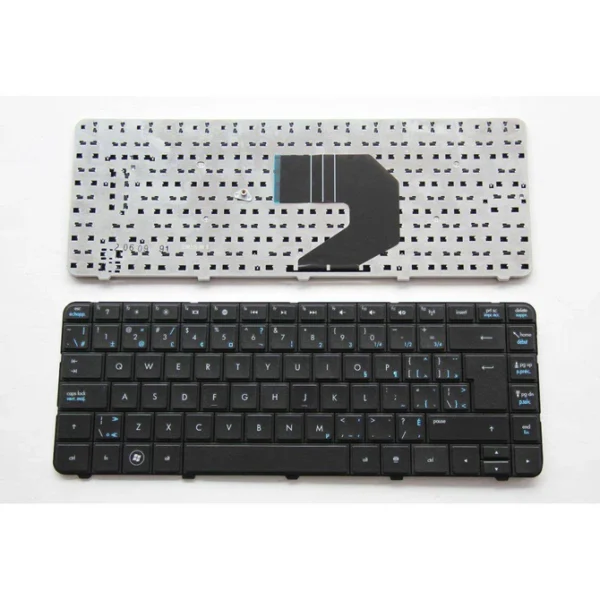
Compaq Presario CQ61 Keyboard Replacement
Compatibility: Perfectly fits Compaq Presario CQ61 laptops.
Design: Full-size layout with ergonomic key spacing.
Features: Spill-resistant, durable construction, long-lasting key response.
Installation: Professionally fitted and tested by Lansotech Solutions.
Warranty: 6 months

Hurry and get discounts on all Apple devices up to 20%
Sale_coupon_15
KSh1,800.00 excl. VAT
Payment Methods:

At Lansotech Solutions, we know how important your laptop is to your daily life.
When the keyboard on your Compaq Presario CQ61 starts failing—keys sticking, missing letters, or simply not responding—it can feel like your productivity has hit a wall.
That’s why we provide a genuine Compaq Presario CQ61 keyboard replacement, carefully installed so you can get back to work, study, or creativity without distractions.
The Compaq Presario CQ61 keyboard is specially designed for this model, ensuring a flawless fit and seamless performance.
No awkward key spacing, no compatibility issues—just a smooth typing experience as if your laptop were brand new.
Enjoy an ergonomic design with well‑spaced keys that reduce fatigue during long hours of typing.
Manufactured from high‑quality materials, this keyboard is durable and resistant to wear, even under heavy daily use.
With a spill‑resistant design, you can rest easy knowing your laptop has an extra layer of defense against accidental liquid spills.
Our experienced technicians at Lansotech Solutions replace your faulty keyboard with precision, test every key, and return your laptop in perfect working condition—often on the same day.
Among many laptop keyboard shops in Nairobi CBD, we’ve built a reputation for excellence and genuine products.
🔧 Original replacement keyboards backed by warranty
🔧 Professional installation and testing
🔧 Affordable prices with same‑day service
🔧 Trusted after‑sales support
Your laptop deserves nothing less than the best, and that’s what we deliver.
Sometimes, keyboard issues are caused not by damage, but by dust and debris.
If your Compaq Presario CQ61 keyboard is dusty, here’s what to do before considering a full replacement:
Turn off and unplug your laptop.
Use compressed air to gently blow out dust from between the keys.
Tilt the laptop at an angle and lightly tap to dislodge hidden particles.
Use a soft brush or microfiber cloth to wipe the surface clean.
Avoid using liquids directly on the keyboard.
If cleaning doesn’t fix the problem, that’s when a genuine replacement from Lansotech Solutions is the best option.Bring your laptop back to life with a Compaq Presario CQ61 keyboard replacement today.
Visit Lansotech Solutions in Nairobi for expert installation, genuine parts, and friendly service you can rely on.
No account yet?
Create an Account











 ASUS
ASUS



