





 Laptop Computers
 Desktop Computers
 Printers

 Network
 Software
 Laptop Accessories
 Laptop Components
 Office
 Desktop peripherals
 Server

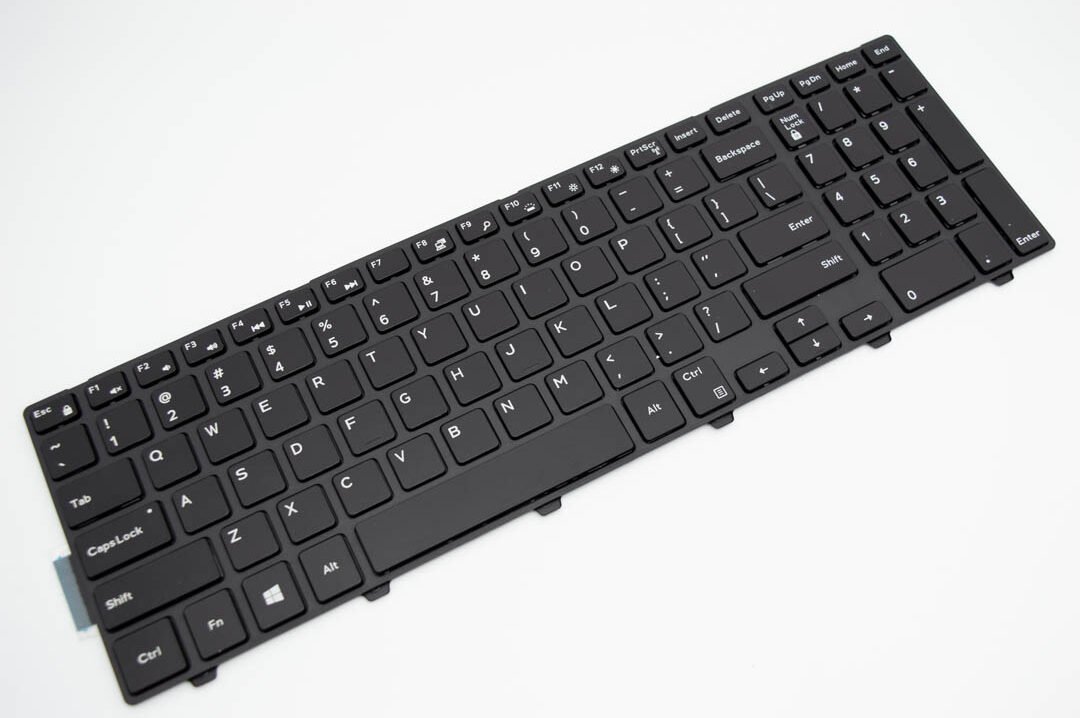
Compatible Models: Dell Inspiron 15 5000 Series (5551, 5555, 5558, 5559)
Layout: US Standard QWERTY
Color: Black
Condition: Brand New – Original Replacement Part
Features:
Seamless fit for Inspiron 15 chassis
Soft, tactile keys for extended use
Factory-quality performance and build

Hurry and get discounts on all Apple devices up to 20%
Sale_coupon_15
KSh1,800.00 excl. VAT
Payment Methods:

At Lansotech Solutions, we offer dependable keyboard replacements tailored specifically for the Dell Inspiron 15 Series. If your current keyboard is unresponsive, missing keys, or making typing a frustrating task, our genuine US layout replacement restores your laptop’s performance and typing comfort.
Whether you’re a student, content creator, or office user, our keyboard offers a responsive and reliable typing experience—just like new.
✅ 100% compatibility with Dell Inspiron 15 5000 Series laptops
✅ Smooth, quiet, and tactile keystrokes
✅ Durable keys built to withstand extended use
✅ Factory-grade fit for seamless integration
✅ Expert installation service available at Lansotech Solutions
✔ Dell Inspiron 15 Series (including 5551, 5555, 5558, 5559, and other 5000 Series variants)
Layout: US Standard QWERTY
Color: Black
Condition: Brand New – Original Replacement Part
Step 1 – Diagnosis
We inspect your device to confirm the keyboard issue.
Step 2 – Safe Disassembly
Our technicians carefully open the laptop with anti‑static tools to prevent damage.
Step 3 – Keyboard Removal
The damaged keyboard is safely removed from the chassis.
Step 4 – Installation
We install the new keyboard with factory alignment for a perfect fit.
Step 5 – Testing & Cleaning
Each key is tested for responsiveness, and we clean the unit before return.
Clean regularly using compressed air or a microfiber cloth
Avoid spills—keep food and drinks away
Use a keyboard cover in dusty environments
Type gently to extend key life
✔ Trusted Dell keyboard experts
✔ Genuine parts only—no imitations
✔ Affordable pricing and fast service
✔ Professional support and installation
✔ Service warranty included
No account yet?
Create an Account











 ASUS
ASUS



