





 Laptop Computers
 Desktop Computers
 Printers

 Network
 Software
 Laptop Accessories
 Laptop Components
 Office
 Desktop peripherals
 Server

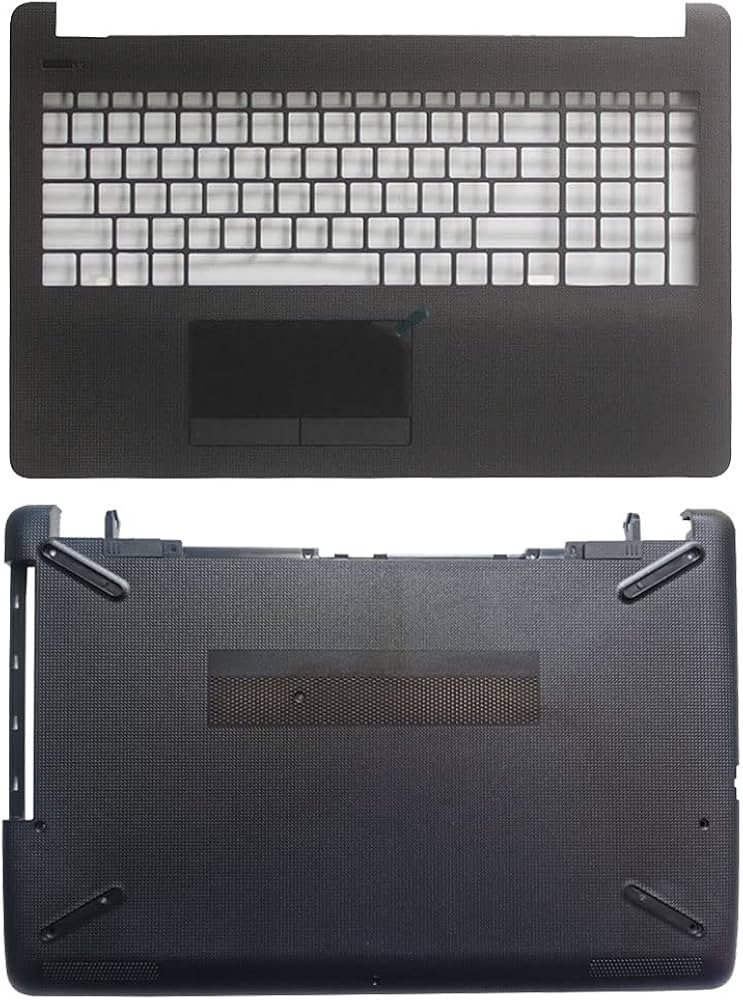
1x Palmrest Casing
1x Bottom Base Cover
Note: Keyboard, touchpad, and other internals not included unless specified.
designed specifically for:
✅ HP 15-BS Series
✅ HP 15-BW Series
✅ HP 15G-BR Series
✅ HP 250 G6 (CD Model)

Hurry and get discounts on all Apple devices up to 20%
Sale_coupon_15
KSh3,500.00 excl. VAT
Payment Methods:

When it comes to maintaining your HP laptop in top-notch condition, replacing worn or damaged casing components is crucial. The HP 15-BS, 15-BW, 15G-BR, and 250 G6 series are some of the most widely used models, and replacing their palmrest or bottom base casing can restore not only the aesthetics but also the structural integrity of your device. Below, we provide a detailed, expert-level breakdown of everything you need to know about HP palmrest and bottom base casing replacements.
Laptop casing is not just about looks. The palmrest and bottom base serve essential functions including:
Structural support for internal components
Heat dissipation through embedded vents and cutouts
Keyboard and touchpad stability
Protection from dust and environmental factors
Replacing a damaged casing ensures your laptop continues to function safely and efficiently.
This guide specifically targets the following models:
HP 15-BS Series
HP 15-BW Series
HP 15G-BR Series
HP 250 G6 Series
All these models share similar chassis layouts and form factors, making them compatible with a range of replacement parts—particularly the CD palmrest and bottom base casings.
Not sure if your casing needs a replacement? Watch out for these telltale signs:
Cracks or chips in the palmrest area
Loose or misaligned keyboard or touchpad
Warped or broken bottom base panel
Missing or stripped screw holes
Noticeable overheating due to blocked or broken vents
Aesthetic degradation due to scratches or fading
Promptly replacing the casing ensures long-term durability and prevents more serious damage to internal components.
The palmrest casing is the upper cover that surrounds the keyboard and touchpad. It often includes:
Touchpad and touchpad buttons
Power button slot
Speaker grille cutouts
Screw mounts for the keyboard
CD drive alignment (if applicable)
When sourcing a replacement, ensure that it includes the touchpad ribbon cable, if yours is damaged or missing.
The bottom base panel is the foundational casing beneath your laptop. It generally includes:
Ventilation grids for airflow
Speaker and HDD access ports
Mounting points for the battery, motherboard, and fan
Rubber feet for surface elevation
Pre-marked screw positions
Opting for a genuine or OEM-compatible bottom base casing ensures exact fitment and uncompromised structural performance.
Replacing your palmrest and bottom base casing is a moderately complex task requiring careful disassembly and reassembly. Follow these steps:
Shut down the laptop and remove the battery.
Remove all visible screws from the bottom panel.
Carefully use a plastic prying tool to detach the bottom base.
Disconnect all ribbon cables (touchpad, keyboard, etc.).
Remove the keyboard, RAM, HDD, and cooling fan.
Take out the motherboard and daughterboards if necessary.
Align and place the new palmrest casing, ensuring all screw mounts and cutouts align.
Secure the touchpad cable and reinstall the keyboard.
Replace internal components onto the new bottom base panel.
Reattach all cables and boards.
Secure all screws back into their respective positions.
Reconnect the battery and power on the device to ensure all functions work.
To replace the casing effectively, prepare the following tools:
Small Phillips screwdriver set
Plastic pry tool
Antistatic wrist strap
Tweezers (for ribbon cables)
Thermal paste (if removing the heatsink)
Always work on a clean, static-free surface to prevent accidental damage.
When looking for reliable HP 15-BS, 15-BW, 15G-BR, or 250 G6 replacement casings, ensure you’re buying from authorized retailers or reputable online platforms. Look for:
OEM compatibility
Positive product reviews
Inclusion of touchpad and buttons (if needed)
Matching color and model numbers
Avoid generic parts without clear specifications—they often lack durability and may not fit correctly.
After replacing the casing, follow these maintenance tips to prolong your laptop’s life:
Use a cooling pad to prevent overheating.
Keep the vents clean with compressed air.
Avoid placing heavy objects on the laptop.
Handle with dry, clean hands to reduce wear on the palmrest.
Routinely check for loose screws or misalignment.
These practices ensure that your new casing retains its function and appearance for years.
Q: Is the HP 15-BS palmrest compatible with HP 250 G6?
A: Yes, many parts including the palmrest and bottom base casing are interchangeable among the HP 15-BS, 15-BW, 15G-BR, and 250 G6 series due to their similar chassis structure.
Q: Can I replace the casing myself or should I hire a professional?
A: If you are comfortable handling small electronics and following disassembly guides, you can do it yourself. Otherwise, a professional technician can ensure proper reassembly.
Q: Will replacing the casing void my warranty?
A: If your laptop is still under manufacturer warranty, self-repair may void it. Always check your warranty terms before proceeding.
A high-quality HP 15-BS, 15-BW, 15G-BR, 250 G6 palmrest and bottom base casing replacement not only revives the aesthetic appeal but also enhances functionality and longevity. By using genuine parts and following proper installation methods, you can restore your laptop to its original performance level with confidence.
No account yet?
Create an Account











 ASUS
ASUS



