






 Laptop Computers
 Desktop Computers
 Printers

 Network
 Software
 Laptop Accessories
 Laptop Components
 Office
 Desktop peripherals
 Server

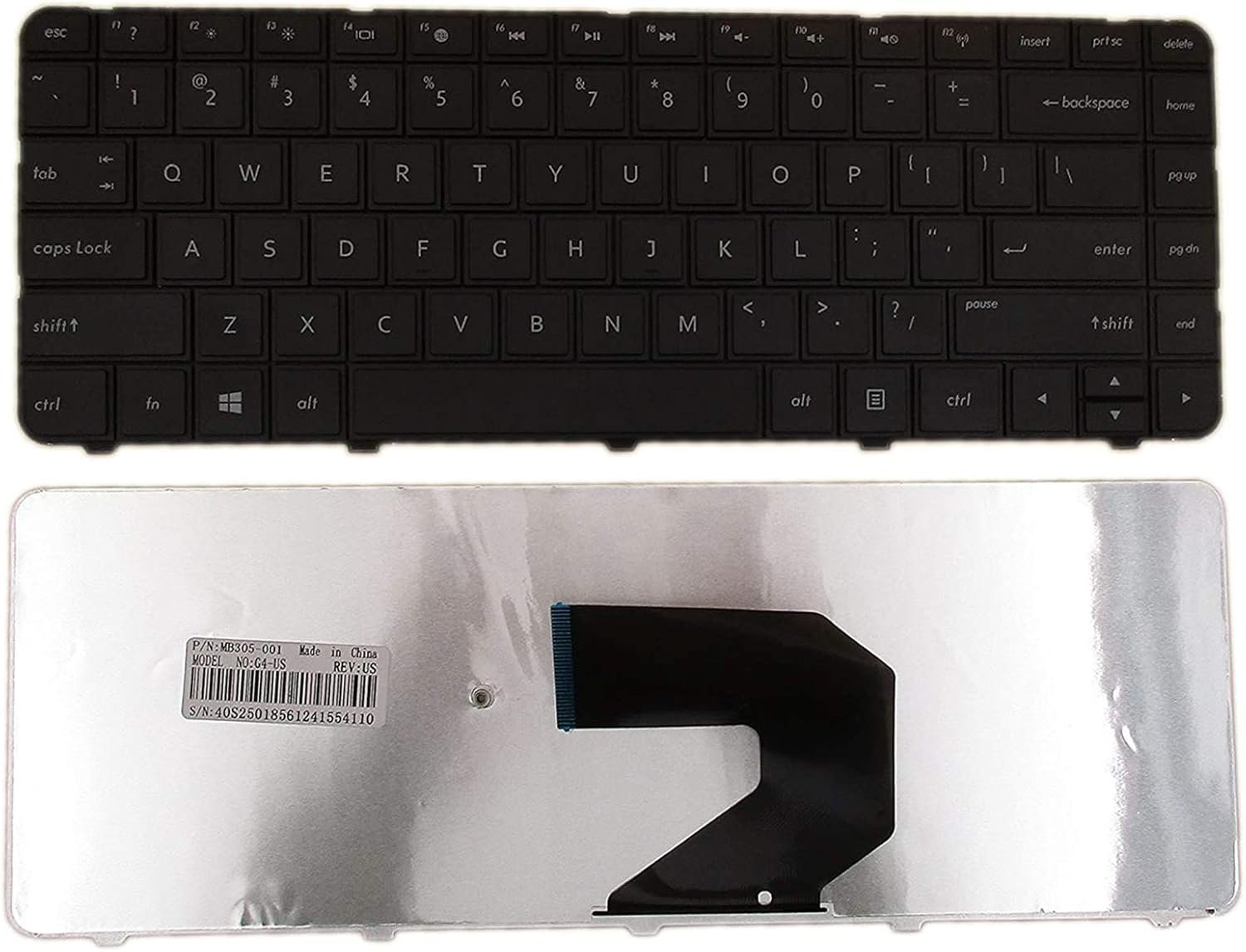
Compatible Models: HP 2000 Series (100, 200, 300, 400)
Layout: US Standard (QWERTY)
Color: Black
Condition: Brand New, Original HP Part
Features:
Comfortable key travel and excellent tactile response
Engineered for heavy daily use
Perfect fit, no modifications needed

Hurry and get discounts on all Apple devices up to 20%
Sale_coupon_15
KSh1,800.00 excl. VAT
Payment Methods:

At Lansotech Solutions, we specialize in high‑quality laptop repairs and parts supply in Nairobi. If your HP 2000 series laptop keyboard is failing, unresponsive, or has missing keys, our genuine US layout keyboard replacement is exactly what you need. We ensure your laptop regains its original smooth typing performance, making your workflow seamless whether you’re a student, a business professional, or a developer who needs a comfortable keyboard for long coding sessions.
Opting for an original keyboard gives you unmatched benefits:
Exact compatibility with your HP 2000 series laptop.
Responsive, accurate keystrokes for faster and easier typing.
Durable build quality that withstands heavy, daily use.
US standard layout with a professional black finish.
At Lansotech Solutions, we only stock brand new, factory‑tested HP keyboards to guarantee you get long‑lasting performance.
This keyboard fits all HP 2000 series laptops, including:
✔ HP 2000‑100 series
✔ HP 2000‑200 series
✔ HP 2000‑300 series
✔ HP 2000‑400 series
If you’re unsure about your exact model, our technicians can help verify compatibility before installation.
We handle your laptop with extreme care through a professional, step‑by‑step process:
Step 1 – Careful Inspection
We confirm that your keyboard needs replacing and check for other issues.
Step 2 – Safe Disassembly
Using precision tools, we open your laptop without damaging internal components.
Step 3 – Removing the Faulty Keyboard
The old keyboard is removed with care, ensuring the motherboard and cables remain intact.
Step 4 – Installing Your New Keyboard
We fit the genuine HP keyboard, secure all screws and ribbon cables properly.
Step 5 – Final Testing and Cleaning
Every key is tested for responsiveness, and we clean the laptop before returning it to you.
Once your new keyboard is installed, keeping it clean is essential for long‑term performance:
Use compressed air weekly to remove dust and crumbs.
Wipe with a microfiber cloth and isopropyl alcohol for a smooth surface.
Avoid eating or drinking near your laptop to prevent spills.
Consider a keyboard protector to block dirt and moisture.
Type gently to maintain the key mechanisms and prolong their life.
These simple habits will keep your HP 2000 keyboard in excellent working condition.
✔ Certified technicians with extensive HP experience
✔ Original HP parts in stock for quick service
✔ Same‑day replacement available
✔ Affordable prices and warranty on both parts and labor
✔ Trusted by developers, students, and businesses all over Nairobi

No account yet?
Create an Account











 ASUS
ASUS



