





 Laptop Computers
 Desktop Computers
 Printers

 Network
 Software
 Laptop Accessories
 Laptop Components
 Office
 Desktop peripherals
 Server
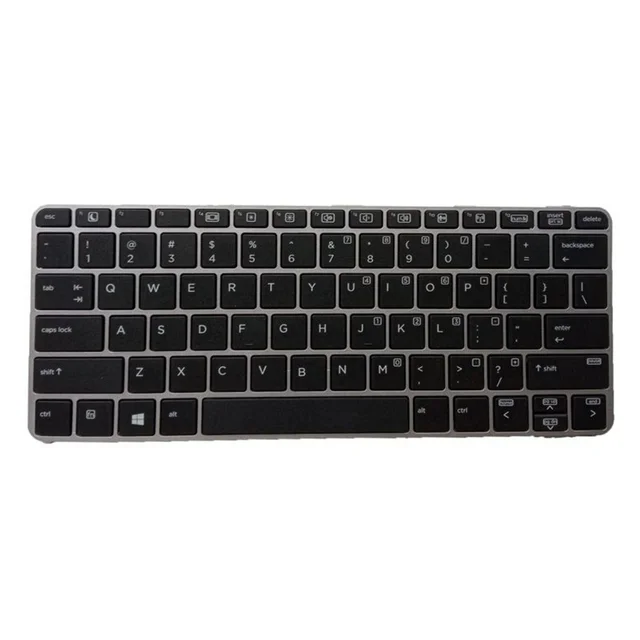
Compatible Models: 725 G3, 725 G4, 820 G3, 820 G4
Layout: US Standard QWERTY
Color: Black
Condition: Brand New – Original HP Part
Features:
Smooth, responsive keys designed for long typing sessions
Perfect fit for EliteBook chassis with factory‑grade alignment
Built to last with high‑quality materials

Hurry and get discounts on all Apple devices up to 20%
Sale_coupon_15
KSh1,800.00 excl. VAT
Payment Methods:

At Lansotech Solutions, we specialize in premium HP laptop repairs and original keyboard replacements. If you own an HP EliteBook 725 G3, 725 G4, 820 G3, or 820 G4 and your keyboard is damaged, unresponsive, or missing keys, we offer a genuine replacement that restores your laptop to peak condition. Our keyboards are designed for a perfect typing experience, making them an excellent choice for professionals and anyone seeking a comfortable keyboard for developers.
A faulty keyboard can disrupt your workflow and cause frustration, especially if you spend long hours coding, writing, or handling data. Replacing it with an original HP keyboard ensures:
✅ Precise compatibility with HP EliteBook 725 G3, 725 G4, 820 G3, and 820 G4.
✅ Responsive, tactile keys that improve typing speed and comfort.
✅ Durable construction built to withstand daily use.
✅ Seamless fit and finish to maintain your laptop’s premium look.
✔ HP EliteBook 725 G3
✔ HP EliteBook 725 G4
✔ HP EliteBook 820 G3
✔ HP EliteBook 820 G4
Layout: US Standard QWERTY
Color: Black
Condition: Brand New – Genuine HP Replacement
We follow a careful, transitional process to ensure your laptop is returned to you in perfect condition:
Step 1 – Diagnostic Check
We confirm that your current keyboard is the source of the issue.
2 – Safe Disassembly
Our skilled technicians open your laptop using specialized tools to protect internal components.
Step 3 – Faulty Keyboard Removal
We disconnect and remove the old keyboard without affecting other parts.
4 – Precise Installation
Your brand‑new genuine HP keyboard is installed and aligned perfectly.
Step 5 – Testing and Cleaning
We test every key for accuracy and responsiveness, then clean your laptop thoroughly before handing it over.
To maintain your new keyboard and enjoy a comfortable keyboard for developers:
Use compressed air weekly to remove dust and debris.
Wipe gently with a microfiber cloth and isopropyl alcohol to sanitize.
Keep food and drinks away from your laptop.
Consider a keyboard cover in dusty environments.
Type gently to prolong key life and mechanism durability.
✔ HP-certified technicians with years of expertise
✔ Authentic HP replacement parts only
✔ Fast turnaround with affordable pricing
✔ Warranty on every installed keyboard
No account yet?
Create an Account











 ASUS
ASUS



