





 Laptop Computers
 Desktop Computers
 Printers

 Network
 Software
 Laptop Accessories
 Laptop Components
 Office
 Desktop peripherals
 Server

Power Output: 240W /500W (varies by model)
Input Voltage: 100V – 240V AC, 50/60Hz
Efficiency Rating: 80 PLUS Bronze / Gold Certified
Cooling System: Thermally controlled fan
Form Factor: SFF or MT (Small Form Factor / Mini Tower)
Connector Type: 6-pin or 8-pin proprietary HP power connectors
Safety Features: Over-voltage, over-current, and short-circuit protection
Operating Temperature: 10°C – 40°C
Compatibility: HP EliteDesk 800 G1 SFF / Tower systems
Certifications: CE, UL, RoHS Compliant
These specifications ensure optimal compatibility and performance with HP’s EliteDesk 800 G1 series.

Hurry and get discounts on all Apple devices up to 20%
Sale_coupon_15
KSh2,500.00 excl. VAT
Payment Methods:

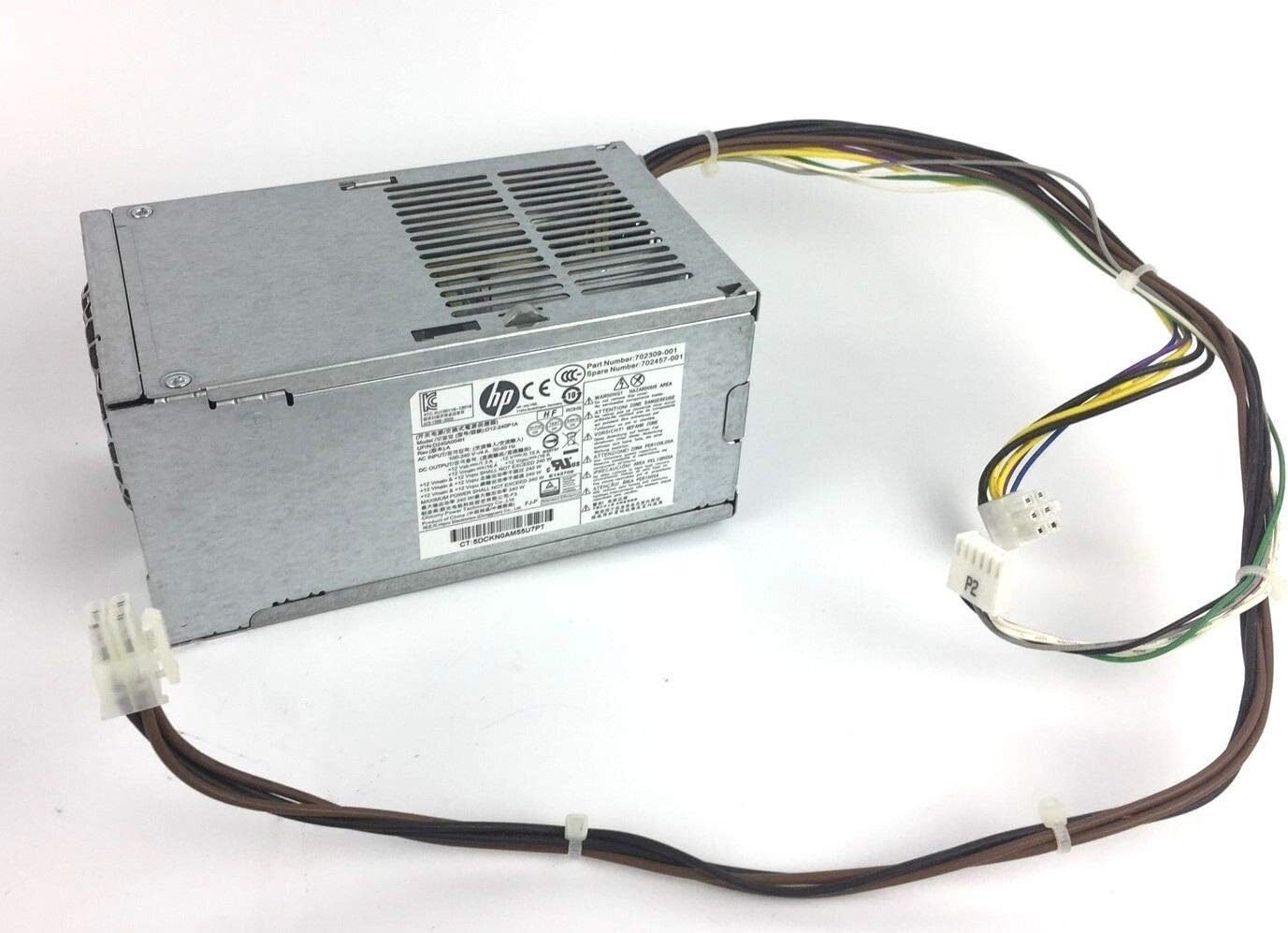
At Lansotech Solutions, the leading HP parts and accessories supplier in Nairobi, Kenya, we understand the importance of having a dependable and efficient power supply for your desktop PC. The HP EliteDesk 800 G1 Power Supply is one of the most sought-after components for users seeking to restore or upgrade their HP business desktops. As a genuine HP component, it ensures stable power delivery, quiet operation, and long-lasting reliability — making it the best choice for offices, institutions, and professional environments.
The HP EliteDesk 800 G1 is a business-class desktop computer designed for speed, reliability, and efficiency. Like all powerful workstations, it depends on a stable and efficient Power Supply Unit (PSU) to run optimally. The genuine HP EliteDesk 800 G1 PSU delivers clean, consistent power to the system’s motherboard, processor, storage devices, and peripherals.
Available in both Small Form Factor (SFF) and Tower versions, the HP EliteDesk 800 G1 power supply is designed to fit perfectly into your system chassis while maintaining HP’s strict power and efficiency standards.
The PSU provides steady voltage and current, ensuring all components — from the Intel processor to the storage drives — receive clean, uninterrupted power. This prevents system crashes, freezes, and potential component damage caused by voltage fluctuations.
The HP EliteDesk 800 G1 PSU typically carries an 80 PLUS Bronze or Gold certification, meaning it operates at high efficiency levels (up to 90%). This reduces power wastage, lowers heat output, and cuts electricity costs — perfect for energy-conscious offices.
Equipped with a thermally controlled cooling fan, this PSU maintains an ideal internal temperature while minimizing noise. The fan adjusts automatically depending on system load, keeping your workstation quiet even during intensive use.
Designed to fit precisely within the EliteDesk 800 G1 chassis, this power supply ensures seamless integration. Whether your desktop is a Small Form Factor (SFF) or Mini Tower (MT), HP offers specific models that match your system perfectly.
The genuine HP PSU includes over-voltage, over-current, and short-circuit protection. These built-in safeguards protect your valuable components from electrical damage, ensuring years of safe operation.
Depending on your desktop’s form factor, there are different PSU versions available:
HP EliteDesk 800 G1 Small Form Factor (SFF) Power Supply
Compact design for slim desktops.
Power rating: 240W – 320W.
Common part numbers: 702307-001, 702308-001, DPS-240AB-9A.
HP EliteDesk 800 G1 Tower Power Supply (MT)
Larger PSU for tower systems.
Power rating: 400W – 500W.
Common part numbers: 702309-001, DPS-400AB-14A, DPS-500AB-62A.
Before purchasing, confirm your chassis type and part number to ensure compatibility. At Lansotech Solutions, we help identify the right PSU model for your specific HP EliteDesk configuration.
If you notice any of the following issues with your HP EliteDesk 800 G1, it may be time to replace the PSU:
The desktop fails to power on or powers off unexpectedly.
Burning smell or excessive heat from the PSU area.
Unusual noises from the power supply fan.
Intermittent boot issues or random restarts.
No LED indicator light on the motherboard when powered.
When these signs appear, replacing the PSU promptly can prevent damage to other components.
Unplug the power cord and disconnect all cables before installation.
Open the system chassis and locate the existing PSU.
Unscrew the mounting screws and gently remove the old unit.
Install the new HP PSU and secure it with the original screws.
Connect all power cables to the motherboard, CPU, and drives.
Close the chassis, plug in the power cord, and power on the system.
If you’re unsure about installation, the Lansotech Solutions service team in Nairobi provides professional PSU replacement and diagnostics for all HP desktops.
Lansotech Solutions is your trusted source for genuine HP power supplies and computer parts in Kenya. We stock authentic HP PSUs for all EliteDesk models, ensuring every replacement meets OEM standards.
We provide:
Genuine HP-certified parts
Competitive pricing for retail and bulk orders
Professional installation services
Nationwide delivery across Kenya
Whether you manage a corporate IT network or a single workstation, Lansotech Solutions ensures your system runs efficiently with original HP components.
No account yet?
Create an Account











 ASUS
ASUS



