






 Laptop Computers
 Desktop Computers
 Printers

 Network
 Software
 Laptop Accessories
 Laptop Components
 Office
 Desktop peripherals
 Server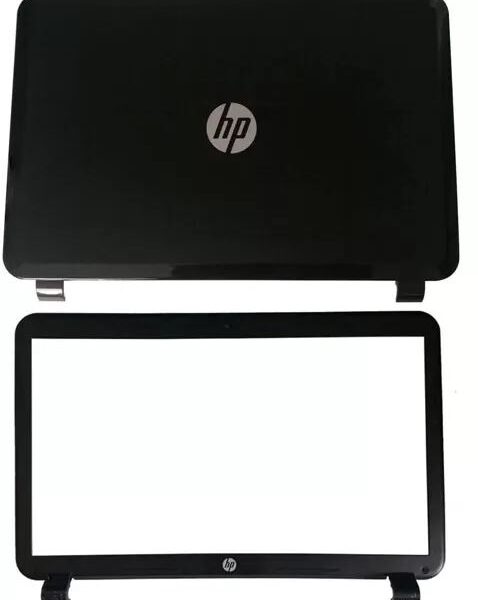

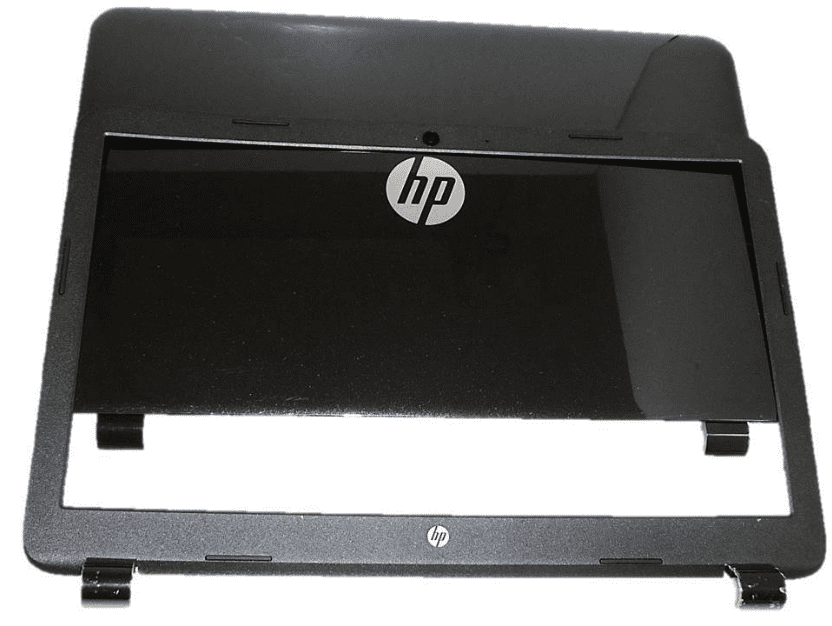
Our (AB) screen casing replacement includes two essential components:
LCD Back Cover – The rear panel that houses and supports the laptop screen
Front Bezel – The frame surrounding the display panel, ensuring screen protection and a clean visual presentation

Hurry and get discounts on all Apple devices up to 20%
Sale_coupon_15
KSh3,800.00 excl. VAT
Payment Methods:

The screen casing of your laptop is more than just a cosmetic feature—it plays a vital role in protecting the display and maintaining the structural integrity of the device. If you’re looking to restore or upgrade your HP 15-R, 15-G, or 250 G3 laptop, our LCD Back Cover and Front Bezel Casing Replacement in a Black Glossy Finish is the premium solution you’ve been searching for.
Our (AB) screen casing replacement includes two essential components:
LCD Back Cover – The rear panel that houses and supports the laptop screen
Front Bezel – The frame surrounding the display panel, ensuring screen protection and a clean visual presentation
This replacement kit is designed to match original HP specifications, ensuring a flawless fit and finish while offering durability and a sleek, professional appearance.
Designed to work perfectly with:
HP 15-R Series (e.g., 15-r001, 15-r029, 15-r100 series)
HP 15-G Series (15-g000 to 15-g199 models)
HP 250 G3 Series
Part Compatibility: HP spare part numbers such as 760965-001, 760962-001, and equivalents
Whether your laptop belongs to the R-series, G-series, or the 250 G3 business class, this replacement ensures a precise OEM-level fit with no adjustments required.
With a polished black glossy coating, this casing replacement restores your laptop to a pristine, like-new condition. It’s perfect for both aesthetic enhancement and protection from scratches, smudges, and everyday wear.
Built from impact-resistant ABS material, this replacement offers robust protection for the delicate LCD panel. It’s designed to endure pressure, drops, and long-term usage without cracking or flexing.
Every port, hinge hole, and mounting bracket is molded to exact HP standards, ensuring a tight fit with the laptop’s internal hinges and screen components. No warping. No misalignment. Just a smooth, secure installation process.
Loose or cracked screen casing often stems from weak hinge mounting points. Our upgraded design features reinforced hinge zones, preventing screen wobble and extending the overall life of your laptop screen.
If your HP 15-R, 15-G, or 250 G3 is showing the following signs, it’s time to replace the casing:
Cracked or loose back panel
Detached or broken front bezel
Screen flickering due to loose hinge support
Display misalignment
Cosmetic damage that makes the laptop look old or unprofessional
Don’t ignore physical damage—it can lead to screen disconnection, further internal issues, and even more costly repairs.
Our replacement kit includes:
1x LCD Back Cover (Black Glossy Finish)
1x Front LCD Bezel Frame
Precision molding and screw holes compatible with original parts
Protective packaging to prevent damage during delivery
Note: This does not include the LCD screen, hinges, or webcam module. These must be transferred from your existing device.
Caution: If you’re unfamiliar with laptop disassembly, consider seeking professional help. However, skilled users can follow this general guide:
Power off the laptop and disconnect the battery.
Open the screen panel by removing screw covers and bezel screws.
Carefully pry off the front bezel using a plastic spudger.
Disconnect the LCD panel from its brackets and cables.
Unscrew the hinges connected to the back panel.
Remove the damaged back cover, and transfer any attached parts (antenna cables, webcam, etc.).
Install the new back panel and reattach the screen and bezel securely.
The process takes 30–60 minutes with the right tools and care.
To maintain the shine and strength of your new casing:
Clean gently with a microfiber cloth
Avoid strong chemical cleaners or abrasive materials
Close your laptop with care—don’t force the hinges
Use a laptop sleeve or case when traveling to prevent scratches
A few simple precautions will keep your laptop looking and functioning like new for years to come.
Choosing our product means investing in premium quality and peace of mind:
OEM-grade replacement
Exact fit with HP laptop models
Fast delivery and protective packaging
Dedicated customer support
Cost-effective restoration option instead of buying a new laptop
Our parts are trusted by IT technicians, repair centers, and end-users alike for dependable performance and professional results.
Q: Is this a genuine HP part?
A: It is an OEM-compatible replacement, offering the same fit, finish, and durability as the original.
Q: Will this work with touchscreen models?
A: No, this casing is designed for non-touchscreen models. Touchscreen-compatible versions require a different bezel design.
Q: Do I need to replace both parts or can I replace just one?
A: You can replace only the damaged part if desired, but for best results and alignment, we recommend replacing both together.
Q: What tools are needed for installation?
A: You’ll need a small Phillips screwdriver, plastic prying tools, and optionally tweezers for cable work.
Conclusion
Don’t let a damaged laptop screen casing impact your productivity or appearance. Our HP 15-R 15-G 250 G3 LCD Back Cover and Front Bezel Replacement in Black Glossy is the smart solution to restore your laptop to factory condition. Engineered for durability, perfect fit, and sleek aesthetics, this replacement part is ideal for both DIY users and professionals.
Get the HP 15-R 15-G 250 G3 AB Black Glossy Casing. from Lansotech Solutions today
No account yet?
Create an Account











 ASUS
ASUS



