





 Laptop Computers
 Desktop Computers
 Printers

 Network
 Software
 Laptop Accessories
 Laptop Components
 Office
 Desktop peripherals
 Server
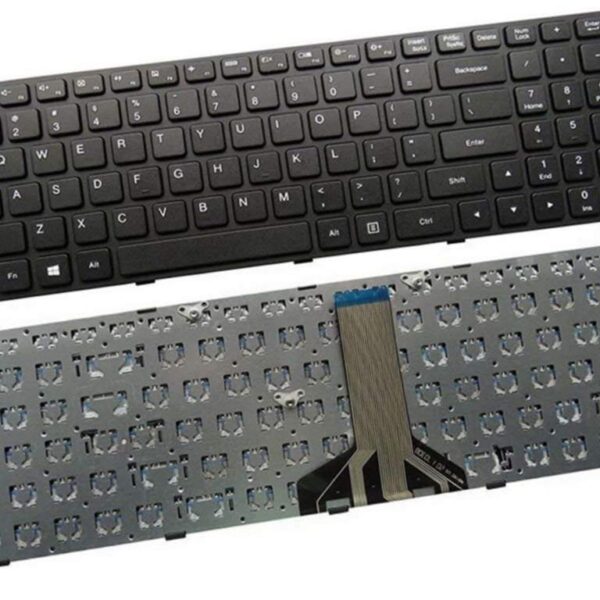
Model Compatibility: IdeaPad 110-15ISK, 110-15IBR, 110-15ACL
Layout: Full QWERTY with numeric keypad
Color: Matte Black
Key Style: Chiclet / Island-style keys
Connection Type: Built-in Flex Cable (ZIF connector)
Backlight: No
Material: High-quality ABS plastic
Condition: Brand New
Available at: Lansotech Solutions, Nairobi
Visit Lansotech for genuine Lenovo keyboard replacements and expert laptop repair services.

Hurry and get discounts on all Apple devices up to 20%
Sale_coupon_15
KSh1,800.00 excl. VAT
Payment Methods:

At Lansotech Solutions, we are proud to be the most trusted laptop service and sales provider in Nairobi, Kenya. One of the most frequently requested services at our workshop is the keyboard replacement and repair of the Lenovo IdeaPad 110-15 laptop. Whether your keyboard is unresponsive, has missing keys, or is completely damaged, we provide professional, affordable, and fast repair solutions.
This detailed guide is designed to help users understand everything about the Lenovo IdeaPad 110-15 keyboard—from its features and common issues to replacement procedures and product specifications.
The Lenovo IdeaPad 110-15 comes with a full-size keyboard that includes a numeric keypad, making it perfect for everyday office tasks, academic work, and casual use. The keyboard is designed for simplicity and durability but is prone to certain common issues over time.
Chiclet-style keys for smoother typing
Full QWERTY layout
Dedicated numeric keypad
Membrane-based design
Function keys with media shortcuts
Integrated with ribbon cable connector
This keyboard is not backlit and does not support RGB or LED lighting. It features black keys with white characters and a compact layout tailored for the 15.6-inch IdeaPad series.
As Nairobi’s go-to laptop technician team, we often handle the following issues related to the Lenovo 110-15 keyboard:
Some keys may stop responding due to:
Worn-out rubber domes
Dust or dirt buildup under keys
Damaged ribbon cable
Cleaning may help in some cases, but extensive failure often requires a complete keyboard replacement.
This typically indicates:
Water or liquid damage
Short-circuiting of internal components
Driver corruption
We advise immediate disconnection and professional inspection to avoid motherboard damage.
Over time, keys may come off due to wear, misuse, or impact. While a few keys can be refitted, in most cases, it’s better to replace the full keyboard assembly for better durability.
Possible causes include:
BIOS misconfiguration
Faulty drivers
Ribbon cable not properly seated
Keyboard hardware failure
Our technicians at Lansotech Solutions perform expert-level replacements using original Lenovo parts. Here’s how we do it:
Anti-static wrist strap
Phillips precision screwdrivers
Plastic pry tools
Tweezers
Soft cleaning cloth
Power off the laptop and remove the battery.
Unscrew the back panel and remove all visible screws.
Disconnect the keyboard ribbon cable from the motherboard.
Use a plastic pry tool to detach the keyboard carefully from the top cover.
Replace with a new, genuine Lenovo keyboard, ensuring all pins are aligned.
Reassemble the laptop and test every key for full functionality.
Our replacement process usually takes under one hour, and we offer on-site services in Nairobi CBD for added convenience.
Many users attempt DIY replacements, but doing so without proper tools or expertise can lead to:
Damaged ribbon cable connectors
Shorted motherboard circuits
Misalignment or faulty key response
We recommend always seeking help from certified technicians, especially for internal hardware repairs like keyboard replacements. At Lansotech Solutions, we ensure safe, fast, and guaranteed repairs.
We stock genuine, high-quality Lenovo IdeaPad 110-15 keyboards at Lansotech Solutions. Whether you’re a technician or end user, we provide both retail and wholesale options.
Brand new Lenovo IdeaPad 110-15 keyboard
Exact OEM fit and finish
3 to 6 months limited warranty
Optional installation by our expert team
Same-day delivery within Nairobi
Maximize the life of your keyboard with these care tips:
Avoid eating and drinking near your laptop
Clean your keyboard regularly with a soft brush or compressed air
Use a silicone keyboard protector
Close the laptop lid gently to prevent pressure damage
Do not use sharp objects to remove stuck keys
Here’s why hundreds of customers trust us every month:
Original Lenovo parts
Affordable pricing with no hidden charges
Same-day service for most keyboard replacements
Trained technicians with years of experience
Central Nairobi location – easy access
Warranty included on all replacements
We also support organizations, schools, and bulk buyers with discounted rates and priority services.
No account yet?
Create an Account











 ASUS
ASUS



