





 Laptop Computers
 Desktop Computers
 Printers

 Network
 Software
 Laptop Accessories
 Laptop Components
 Office
 Desktop peripherals
 Server
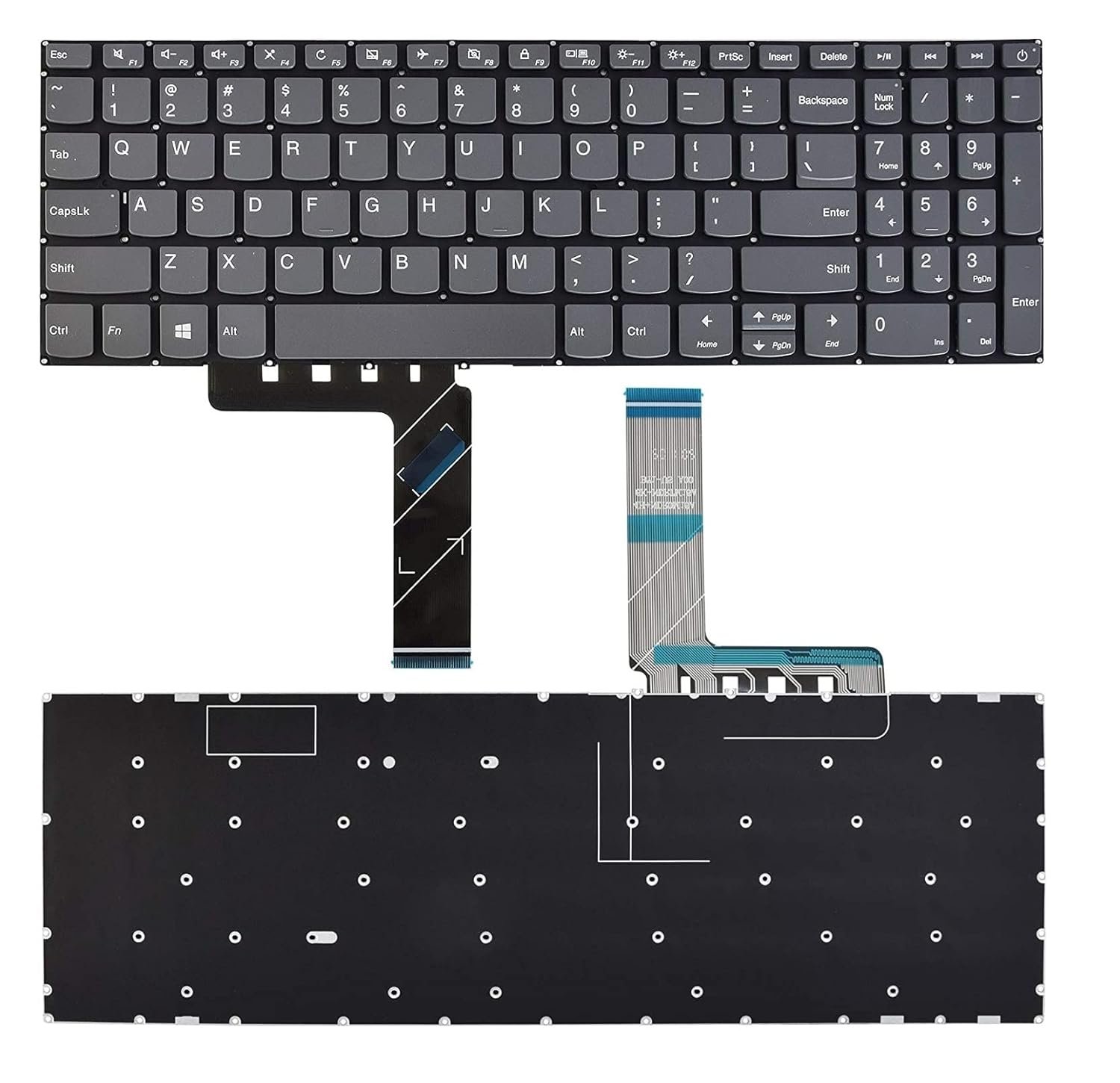
Model Compatibility: Lenovo IdeaPad 130-15IKB, 130-15AST, 130-15ABR
Layout: US/UK QWERTY, with Numeric Keypad
Key Type: Chiclet-style, full-size keys
Color Options: Black / Grey
Material: Durable ABS plastic with matte finish
Connection Type: Ribbon Flex Cable Connector
Warranty: 6 Months
In Stock at: Lansotech Solutions, Nairobi

Hurry and get discounts on all Apple devices up to 20%
Sale_coupon_15
KSh1,900.00 excl. VAT
Payment Methods:

At Lansotech Solutions, we take pride in being the leading laptop repair and sales center in Nairobi, Kenya. Among the most common service requests we receive involves the Lenovo IdeaPad 130-15 keyboard—whether it’s replacement, repair, or troubleshooting issues. This guide is designed to provide a comprehensive, in-depth look into every aspect of the Lenovo IdeaPad 130-15 keyboard, from specifications and functionality to professional solutions.
The Lenovo IdeaPad 130-15 series features a full-size keyboard layout, complete with a numeric keypad on the right. This configuration is ideal for both productivity and everyday use. It uses a membrane-style keyboard which is known for quiet operation and tactile feedback.
Key Features:
Standard QWERTY layout
Integrated numeric keypad
One-piece chiclet keys
Function (Fn) key combinations
Multimedia hotkeys
Spill-resistant membrane design
While the keyboard is designed for durability, it’s still susceptible to damage from liquid spills, key wear, ribbon cable issues, and physical breakage.
As the top laptop service provider in Nairobi, our technicians often resolve the following Lenovo IdeaPad 130-15 keyboard problems:
If certain keys do not respond when pressed, the issue could be due to dust accumulation, faulty contacts, or a damaged keyboard ribbon cable. In some cases, a simple cleaning may solve the problem. If not, a keyboard replacement may be necessary.
This issue usually stems from:
Faulty keyboard drivers
BIOS configuration issues
Loose or disconnected ribbon cables
Hardware-level damage
We recommend visiting Lansotech Solutions for professional diagnostics to isolate whether the issue is software or hardware related.
Spilling water, soda, or other liquids can short out the keyboard circuit. Even a small spill can cause random key presses or complete keyboard failure. In such cases, a full keyboard replacement is required, and sometimes, motherboard inspection as well.
Physical damage is common from dropping heavy objects on the keyboard or applying excess pressure. While individual keys can sometimes be replaced, a full keyboard assembly replacement is more reliable.
Replacing the keyboard in the IdeaPad 130-15 requires technical skill and precision. Here is a high-level breakdown of the replacement process we follow at Lansotech Solutions:
Precision screwdriver set
Plastic pry tools
Anti-static wrist strap
Tweezers
Power off and remove the battery.
Unscrew all bottom casing screws to open the laptop.
Carefully detach the keyboard ribbon cable from the motherboard.
Use a plastic pry tool to gently lift the keyboard out of its frame.
Align the new keyboard correctly and reconnect the ribbon cable.
Screw the casing back and test all key functionalities.
If you’re not confident in doing this yourself, visit us for expert Lenovo keyboard replacement in Nairobi—fast, affordable, and guaranteed.
At Lansotech Solutions, we only use original Lenovo replacement keyboards, sourced directly from authorized suppliers. We avoid counterfeit or third-party keyboards that may have incompatible key configurations or poor durability.
We stock both black and grey variants of the Lenovo IdeaPad 130-15 keyboard, ensuring that you get a perfect match for your device.
Before rushing to replace your keyboard, try the following troubleshooting steps:
Go to Device Manager
Right-click on Keyboard
Select Update driver or Uninstall and reboot
Enter BIOS by pressing F2 or DEL on boot
Load default settings
Save and restart
Plug in a USB keyboard
If it works fine, your laptop keyboard is likely at fault
If the above steps don’t help, it’s time to consult a technician.
We are recognized as Nairobi’s most reliable laptop technicians for several reasons:
Experienced Technicians: Skilled in handling all Lenovo laptop models.
Original Parts: We use 100% OEM Lenovo keyboards.
Affordable Rates: Transparent pricing, no hidden fees.
Same-Day Service: Quick turnaround for keyboard replacements.
Located at a central, easily accessible location in Nairobi, we cater to individuals, corporates, schools, and government institutions.
To extend the life of your keyboard:
Avoid eating and drinking near your laptop
Clean your keyboard weekly using compressed air
Use a keyboard cover for added protection
Don’t press keys too hard—gentle typing improves longevity
If you’re facing any issue with your Lenovo IdeaPad 130-15 keyboard, don’t wait. Visit Lansotech Solutions, the best Lenovo service center in Nairobi, for expert repairs and replacements.
We also sell the Lenovo IdeaPad 130-15 keyboard as a spare part, if you wish to install it yourself or need it for bulk supply.
No account yet?
Create an Account











 ASUS
ASUS



