





 Laptop Computers
 Desktop Computers
 Printers

 Network
 Software
 Laptop Accessories
 Laptop Components
 Office
 Desktop peripherals
 Server
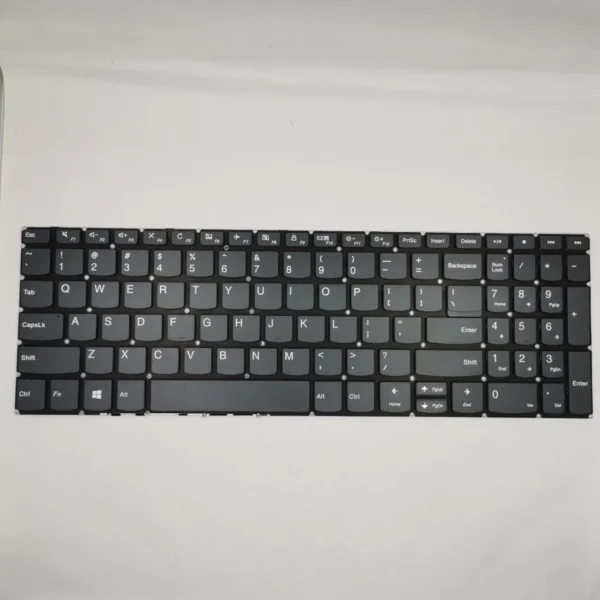
Manufacturer Part Numbers (FRU/PN):
5N20H52613 (non-backlit)
Confirm FRU number based on the original keyboard for guaranteed compatibility.
Compatible Laptop Models:
Lenovo IdeaPad 500-15ISK
Lenovo IdeaPad 510-15ISK (cross-compatible in some variants – confirm chassis design)
Lenovo Z51-70 and Z51-75 series
| Specification | Details |
|---|---|
| Layout | Full-size QWERTY with numeric keypad (US/UK layouts available) |
| Backlight | Available in select models (check motherboard support) |
| Key Mechanism | Scissor-switch, low-profile keys |
| Material | ABS plastic keycaps with matte UV coating |
| Key Travel Distance | Approx. 1.5mm ± 0.2mm |
| Input Interface | Ribbon cable (20-pin ZIF connector, flex type) |
| Chassis Fit | 15.6-inch body, 500-series keyboard frame |
| Color | Matte black with white printed legends |
| Language Support | English (US); other layouts available on request |
| Operating Temperature | 0°C to 60°C |
| Certifications | RoHS, CE, ISO 9001, Lenovo OEM Spec |

Hurry and get discounts on all Apple devices up to 20%
Sale_coupon_15
KSh3,000.00 excl. VAT
Payment Methods:

At Lansotech Solutions, we specialize in providing authentic Lenovo replacement keyboards, including the highly sought-after Lenovo IdeaPad 500-15ISK keyboard. As a trusted supplier and service center in Nairobi CBD, we offer technical-grade components, precision installation, and nationwide delivery. Whether you’re a laptop technician, IT manager, or end user seeking a durable, OEM-certified solution, this article gives you the technical breakdown you need.
While replacing the Lenovo IdeaPad 500-15ISK keyboard can be performed by technically experienced users, we recommend professional installation to avoid damage to the keyboard controller or motherboard.
Precision Phillips screwdriver set (PH0/PH00)
Anti-static wristband (ESD protection)
Plastic pry tool/spudger
Tweezers for ribbon cable handling
Power Down and Isolate Power
Disconnect AC power and battery. Hold the power button for 10 seconds to discharge static.
Access the Bottom Panel
Unscrew the back panel of the laptop. Remove the optical drive (if present). Disconnect any internal sub-assemblies obstructing the keyboard bracket.
Locate and Disconnect Keyboard Flex Cable
The keyboard is connected via a flex ribbon to the motherboard. Use a plastic tool to unlock the ZIF connector.
Remove Old Keyboard
Unclip the internal retaining clips or unscrew the bracket, depending on your variant. Carefully remove the keyboard from the top bezel.
Install the New Keyboard
Align the new keyboard and reinsert the ribbon cable. Lock the ZIF latch securely.
Reassemble and Test
Reinstall the panel, battery, and boot up the laptop. Run a full key diagnostic using Lenovo’s hardware test tools or any key-test utility.
Trackpad Integration: The keyboard is separate from the touchpad but mounted on the same palmrest assembly. Ensure proper alignment to avoid chassis stress.
Key Matrix Design: Uses a multi-layer membrane matrix that detects key actuation via resistance changes. Optimized for low ghosting and anti-rollover.
Durability Rating: Designed for up to 10 million keystrokes per key, suitable for academic, office, and development environments.
Keycap Printing: UV-coated, laser-etched characters for resistance against wear and fading.
Firmware Compatibility: Works out-of-the-box with Windows 10/11 and fully recognized in BIOS and UEFI environments. No special drivers required.
You may need a replacement if:
Specific keys don’t register or double-type
Entire rows/columns of keys are unresponsive
Backlight has failed (for backlit models)
Keys are physically broken, missing, or sticky
BIOS reports keyboard failure during POST
Input lag, jitter, or wrong characters appear when typing
We are recognized among the best laptop keyboard suppliers in Nairobi CBD, known for precision service, high stock availability, and honest support.
Original Lenovo OEM keyboards
Bulk stock available for technicians and IT resellers
Professional installation while you wait (30–60 mins)
Same-day delivery within Nairobi
Secure countrywide shipping with tracking
6-month warranty against manufacturing defects
Use a keyboard protector to minimize dust and spills
Clean with a soft brush or compressed air every week
Avoid resting objects on the keyboard when closed
Always disconnect external power before cleaning
Update BIOS and firmware regularly for optimal performance
We also support:
Educational institutions and computer labs
Corporate IT departments managing employee devices
Laptop repair shops and freelance technicians
Government tenders and NGO ICT supply chains
Discounted pricing is available for bulk orders. Reach out to our team to request a quotation or technical datasheet.
No account yet?
Create an Account











 ASUS
ASUS



