





 Laptop Computers
 Desktop Computers
 Printers

 Network
 Software
 Laptop Accessories
 Laptop Components
 Office
 Desktop peripherals
 Server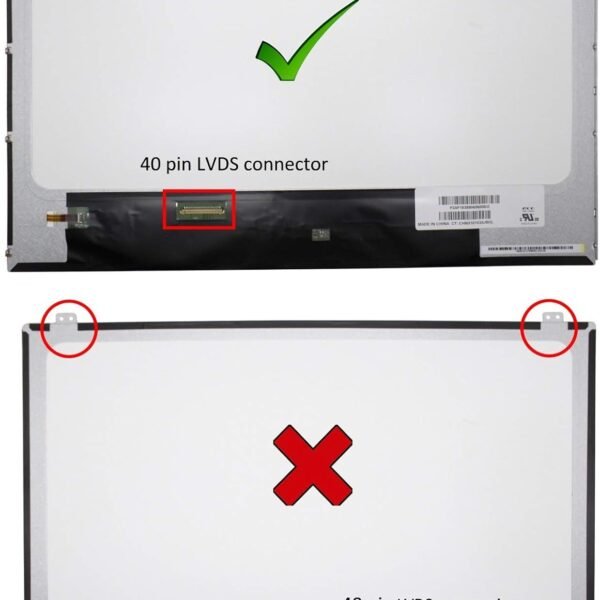

Brand: Non Touch Screen
Size: 15.6 inches
Resolution: WXGA HD
Pixels: 1366 x 768
Type: LED
Backlight Lamp: DIODE
Pin Connection: 40 Pins
Side: Bottom Right
Finish: Matte/Glossy (choose at checkout)
Condition: NEW
Commodity: Laptop Replacement Screen
Technology: Non Touch
Category: Toshiba Laptop Screen Replacement
Dead Pixel Policy: In Accordance with ISO 13406-2 norm
Source: Factory Direct
Packaging: Fragile Customized Package
Compatibility: OEM Compatible

Hurry and get discounts on all Apple devices up to 20%
Sale_coupon_15
KSh6,000.00 excl. VAT
Payment Methods:

Is your Toshiba Satellite C55T-A5123 laptop screen cracked, flickering, or showing lines? At Lansotech Solutions, we specialize in original laptop screen replacements in Nairobi. Whether you are a student, professional, or business owner, replacing your damaged Toshiba screen restores clarity, performance, and productivity without the cost of buying a new laptop.
Genuine Laptop Screens – We stock only OEM-compatible Toshiba screens that perfectly fit your laptop.
Expert Installation – Our technicians in Nairobi CBD can replace your screen quickly and safely.
Trusted Laptop Screen Shop – We are among the Top 10 best laptop screen shops in Nairobi CBD with years of proven service.
Affordable Pricing – Get high-quality screens at competitive prices.
Nationwide Delivery – We deliver to all towns across Kenya with secure packaging.
After replacing your Toshiba Satellite C55T-A5123 screen, follow these tips to keep it safe:
Clean only with a soft microfiber cloth (avoid paper towels or harsh liquids).
Use a screen protector to reduce scratches and fingerprints.
Close your laptop gently and never place objects on the keyboard before shutting the lid.
Store your laptop in a padded bag when traveling to prevent accidental pressure or drops.
Keep your laptop away from liquids and direct heat.
If you’re unsure whether it’s time to replace your screen, here are some issues to look out for:
Cracks or physical damage – Lines, black spots, or complete blackout caused by drops or pressure.
Flickering screen – Indicates internal damage or a failing backlight.
Dead pixels – Black, white, or colored dots that don’t change even when the display updates.
Dim or dark display – Even at maximum brightness, the screen looks faint.
Discoloration – Strange tints or washed-out colors affecting your work or entertainment.
When you notice these problems, it’s best to visit a trusted laptop screen shop in Nairobi CBD like Lansotech Solutions for immediate replacement.
Your laptop screen is one of the most sensitive and expensive parts of your Toshiba Satellite C55T-A5123. Protecting it ensures longevity and saves you money. Here’s why it matters:
Prevents costly replacements due to accidental cracks.
Keeps display quality sharp and colors accurate.
Improves resale value if you plan to upgrade later.
Enhances productivity by maintaining a clear, bright display.
For added protection, we recommend screen guards, laptop bags, and regular cleaning with proper microfiber cloths.


No account yet?
Create an Account











 ASUS
ASUS




