





 Laptop Computers
 Desktop Computers
 Printers

 Network
 Software
 Laptop Accessories
 Laptop Components
 Office
 Desktop peripherals
 Server
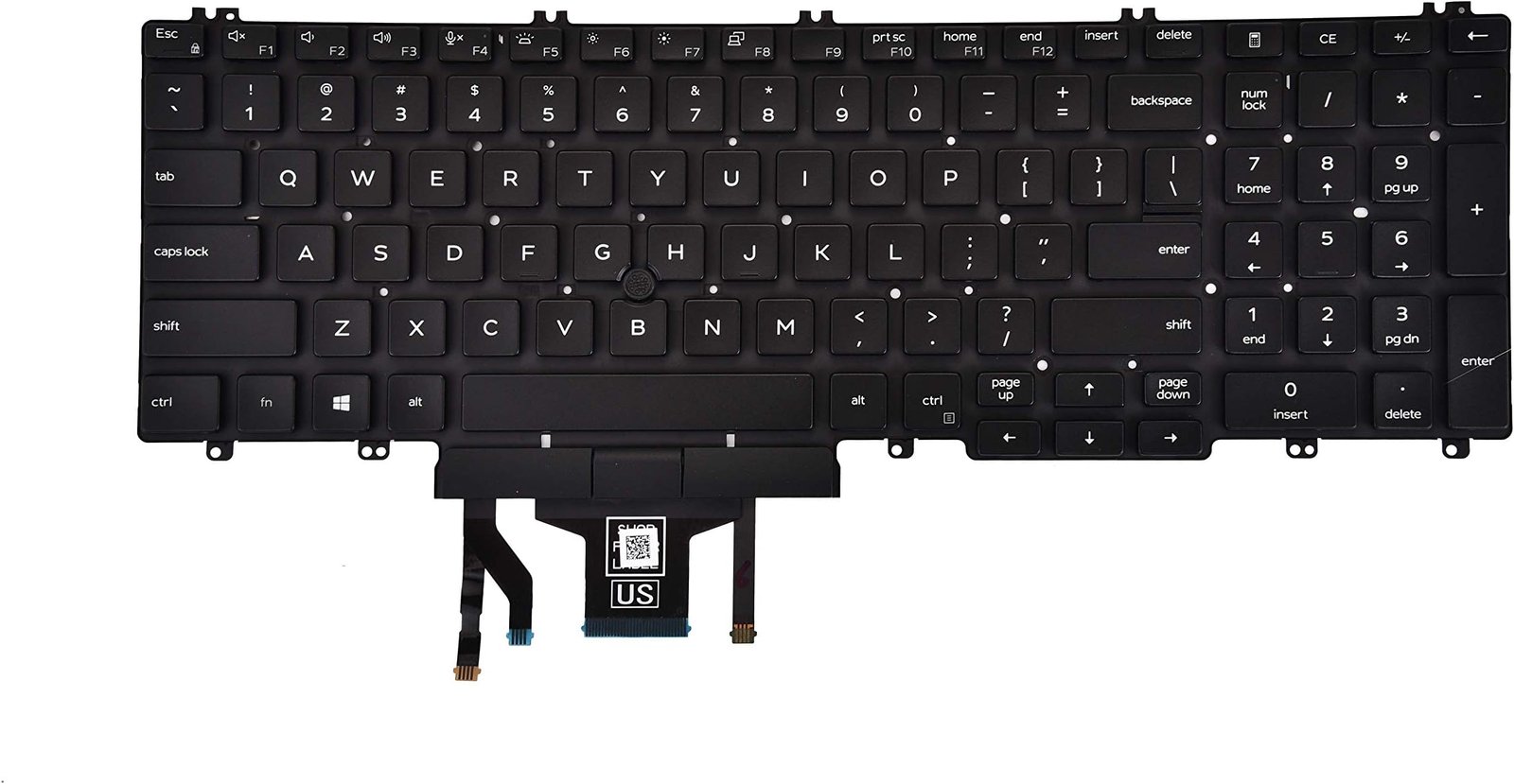
Compatible Models: Dell Latitude E5550, E5570, E5580 / Precision 3510, 7510, 7710
Layout: US Standard QWERTY
Color: Black
Condition: Brand New – Original Dell Part
Features:
Backlit keys for visibility in any lighting
Durable, smooth, and quiet typing experience
Precision-fit for Latitude and Precision chassis

Hurry and get discounts on all Apple devices up to 20%
Sale_coupon_15
KSh3,500.00 excl. VAT
Payment Methods:

At Lansotech Solutions, we supply premium-quality Dell laptop keyboards designed for smooth performance and precise typing. If your Dell Latitude or Precision keyboard is malfunctioning, faded, or missing keys, our US backlit replacement delivers reliable functionality and a sleek, professional look.
Built to meet Dell’s exact specifications, this backlit keyboard enhances low-light usability, making it ideal for students, remote workers, coders, and corporate professionals who rely on extended typing sessions.
Why You Should Replace Your Dell Keyboard
✅ 100% compatibility with Dell Latitude and Precision models
✅ Backlit feature for easy typing in low-light environments
✅ Durable, responsive keys with a soft, tactile feel
✅ Seamless OEM fit and function
✅ Expert installation available at our Nairobi service center
Compatible Dell Models
✔ Latitude E5550 / E5570 / E5580
✔ Precision 3510 / 7510 / 7710
Layout: US Standard QWERTY
Color: Black
Backlight: Yes
Condition: Brand New – Original Dell Replacement
Step-by-Step Keyboard Installation Process
Step 1 – Pre‑Check
We verify your device and diagnose the keyboard fault.
Step 2 – Safe Disassembly
Using anti‑static tools, we access the internal keyboard housing.
Step 3 – Faulty Keyboard Removal
We detach and remove the old keyboard cleanly.
Step 4 – New Keyboard Installation
The new US backlit keyboard is securely installed and aligned.
Step 5 – Functionality Test
Each key, including the backlight, is tested before delivery.
Tips for Keyboard Maintenance
Use compressed air weekly to clear dust
Wipe with alcohol and microfiber cloth
Keep food and liquids away from your laptop
Use a keyboard protector in dusty workspaces
Avoid excessive pressure while typing
Why Choose Lansotech Solutions
✔ Dell-trained technicians with years of hands-on experience
✔ 100% genuine parts with warranty
✔ Professional-grade service and quick turnaround
✔ Trusted by educational institutions, developers, and corporates
✔ Convenient support across Nairobi and beyond
No account yet?
Create an Account











 ASUS
ASUS



