





 Laptop Computers
 Desktop Computers
 Printers

 Network
 Software
 Laptop Accessories
 Laptop Components
 Office
 Desktop peripherals
 Server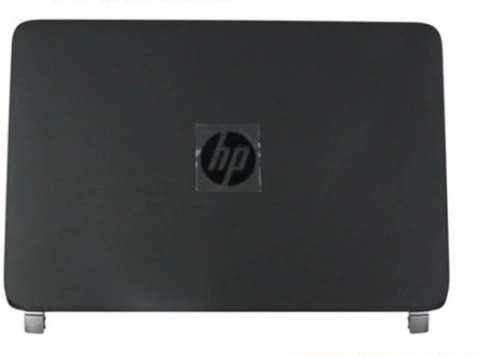
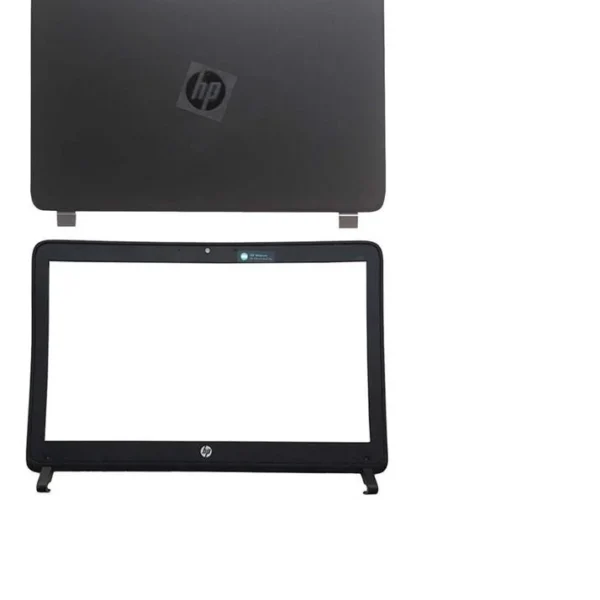
HP 440 G1 445 G1 (AB) LCD Back Cover and Front Bezel replacements are 100% compatible with the following laptop models:
HP ProBook 440 G1
HP ProBook 445 G1
Compatible Part Numbers Include:
720573-001
720572-001
765734-001
765733-001

Hurry and get discounts on all Apple devices up to 20%
Sale_coupon_15
KSh4,000.00 excl. VAT
Payment Methods:

When it comes to maintaining the performance and appearance of your HP ProBook 440 G1 or 445 G1 laptop, the LCD Back Cover and Front Bezel casing play a crucial role. Over time, these parts can become scratched, cracked, or damaged due to regular use or accidental drops. At our store, we offer high-quality replacement parts designed specifically for the HP 440 G1 and HP 445 G1 series, ensuring a perfect fit and long-lasting durability.
The LCD Back Cover and Front Bezel are not just cosmetic components. They serve as protective enclosures for your laptop’s screen assembly, safeguarding sensitive components such as the display panel, hinges, and webcam. A damaged casing can lead to screen instability, hinge misalignment, and even further internal damage if not replaced promptly.
By replacing these parts with original-quality components, you can restore your laptop’s professional look and structural integrity, ensuring a longer lifespan for your HP ProBook.
Our HP 440 G1 445 G1 (AB) LCD Back Cover and Front Bezel replacements are 100% compatible with the following laptop models:
HP ProBook 440 G1
HP ProBook 445 G1
Compatible Part Numbers Include:
720573-001
720572-001
765734-001
765733-001
Every part is meticulously inspected to ensure perfect OEM specifications and seamless compatibility with your device.
We understand that durability and quality are non-negotiable when it comes to laptop repairs. Our HP 440 G1 and 445 G1 replacement casings are built using high-grade ABS plastic and reinforced inner brackets, offering excellent rigidity and heat resistance.
Each replacement part features:
Smooth matte finish for a professional look.
Precision-cut screw holes and snap-fit joints for easy installation.
Sturdy hinge mounts that maintain screen alignment.
OEM-grade design ensuring exact fitting and original aesthetics.
This attention to detail ensures that your laptop not only looks brand new but also maintains its original functional reliability.
Over time, physical wear and tear can affect the usability and appearance of your HP ProBook. You may need a replacement if you notice:
Cracks or broken edges on the LCD cover or bezel.
Loose hinges or screen wobbling when opening or closing the lid.
Missing clips or screw mounts causing misalignment.
Scratches or dents diminishing the laptop’s professional appearance.
Display instability due to structural weakness around the screen.
If any of these issues sound familiar, replacing your LCD Back Cover and Front Bezel casing is a smart and cost-effective solution.
Replacing the casing parts of your HP ProBook 440 G1 or 445 G1 is a straightforward process with the right tools and a little patience. Follow these steps carefully:
Precision screwdriver set
Plastic pry tool or spudger
Anti-static wrist strap (optional but recommended)
Power Off and Unplug
Shut down your laptop completely and remove the battery to prevent any electrical damage.
Remove the Bezel
Use a plastic pry tool to gently lift and detach the front bezel from around the LCD screen. Work slowly to avoid damaging the clips.
Unscrew the LCD Panel
Once the bezel is removed, unscrew the four screws securing the display panel to the back cover. Carefully tilt the screen forward.
Disconnect the Display Cable
Detach the video cable connecting the LCD panel to the motherboard. Handle the cable gently to prevent tearing.
Replace the Back Cover
Remove the old back cover and install the new one, aligning all hinge mounts and screw holes perfectly.
Reconnect and Reassemble
Reattach the display cable, mount the LCD panel back, and screw it securely. Snap the new bezel back in place.
Final Inspection
Reconnect the battery, power on the laptop, and verify that the display is functioning correctly.
By following these steps, you can successfully replace the HP 440 G1 or 445 G1 casing and restore your laptop’s sleek, durable form.
Our mission is to deliver exceptional quality replacement parts that exceed customer expectations. Here’s why thousands of users trust our HP laptop components:
Exact Fit Guarantee: Designed to match your original HP casing perfectly.
High-Quality Materials: Made from durable ABS plastic with reinforced structural support.
Competitive Pricing: Offering the best balance between cost and quality.
Professional Support: Our expert team provides technical guidance for hassle-free installation.
Fast Shipping: Secure packaging and timely delivery across regions.
When you choose our HP 440 G1 445 G1 LCD Back Cover and Front Bezel replacements, you invest in quality, reliability, and peace of mind.
To ensure your new casing remains in excellent condition for years to come, follow these simple maintenance tips:
Avoid placing heavy objects on top of your laptop lid.
Clean regularly with a soft microfiber cloth and mild cleaner.
Always open and close the lid gently, using the center of the screen to reduce hinge stress.
Use a protective sleeve or case when transporting your laptop.
These preventive measures can extend the life of your laptop’s exterior and keep it looking like new.
Replacing your HP 440 G1 or 445 G1 LCD Back Cover and Front Bezel casing is the most effective way to revitalize your laptop without the need for a full replacement. With our premium-quality parts, you can restore both functionality and aesthetics, giving your device a renewed, professional appearance.
Whether you are a technician, a student, or a business professional, choosing the right replacement casing ensures your HP ProBook continues to perform reliably and look as good as the day you bought it.
No account yet?
Create an Account











 ASUS
ASUS



