






 Laptop Computers
 Desktop Computers
 Printers

 Network
 Software
 Laptop Accessories
 Laptop Components
 Office
 Desktop peripherals
 Server
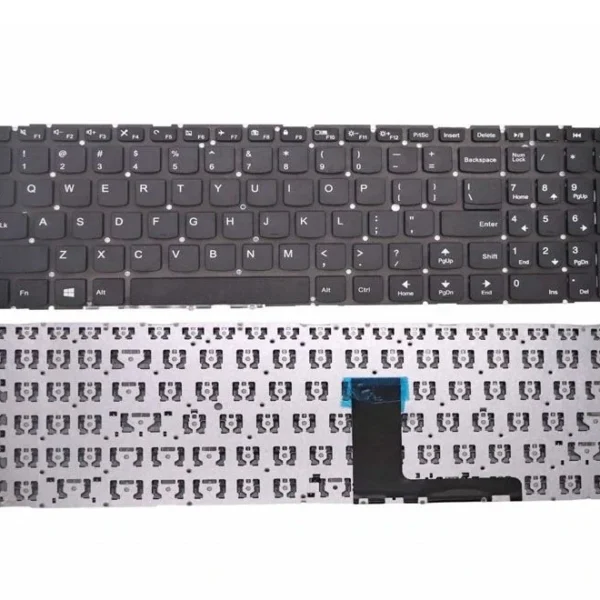
| Specification | Details |
|---|---|
| Layout | QWERTY (US and UK layout options) |
| Key Style | Chiclet / Island-style keys |
| Color | Black matte finish |
| Backlit | none |
| Connector | Ribbon cable with ZIF connector |
| Material | ABS plastic with anti-fade UV coating |
| Condition | Brand new, OEM Lenovo original |
| Warranty | 6 Months for manufacturing defects |
Lenovo IdeaPad 320-15IKB
Lenovo IdeaPad 320-15 Series (Check exact model code to confirm)
Lenovo IdeaPad 320-15IAP

Hurry and get discounts on all Apple devices up to 20%
Sale_coupon_15
KSh2,400.00 excl. VAT
Payment Methods:

If you’re experiencing keyboard issues on your Lenovo IdeaPad 320-15IKB, you’re not alone. Whether it’s unresponsive keys, liquid damage, or worn-out letters, replacing your keyboard is a crucial step to restore the laptop’s performance. At Lansotech Solutions, located in Nairobi CBD, we provide and install original Lenovo IdeaPad 320-15IKB keyboards for individuals, businesses, and IT resellers across Kenya.
As one of the most trusted and legit laptop keyboard suppliers in Nairobi, we guarantee quality parts, expert fitting, and competitive prices.
The IdeaPad 320-15IKB is part of Lenovo’s mid-range consumer series, designed for both productivity and entertainment. Its keyboard, like many in its class, is susceptible to wear from daily use, accidental spills, and mechanical failure.
Replacing the keyboard restores typing efficiency and avoids the use of unreliable external keyboards or software-based workarounds.
Keyboard replacement in the IdeaPad 320-15IKB requires partial disassembly, often involving the removal of the bottom casing and sometimes the battery and mainboard. At Lansotech Solutions, our technicians are highly trained in Lenovo hardware repair and use the correct tools to ensure a safe and successful installation.
Service Highlights:
Professional disassembly of laptop base
Old keyboard removal without damaging internal components
New keyboard installation and secure connection
Testing all keys and confirming system detection
Time Required: 30–60 minutes
You may need a new keyboard if:
Keys are physically broken or missing
Keys don’t respond or respond intermittently
Typing outputs incorrect characters
Keyboard not detected in BIOS or Windows
Spillage from drinks or food
Wear and tear from long-term usage
Ignoring these signs can lead to poor productivity and even further internal damage if the fault involves liquid.
We are a leading source for genuine Lenovo keyboards in Nairobi, known for quality assurance, competitive pricing, and trusted customer service. As one of the most established laptop keyboard shops in Nairobi CBD, our reputation is built on:
Supplying only genuine Lenovo OEM keyboards
Fast and efficient installation services
Affordable pricing for individuals and bulk orders
In-stock availability for most models
Friendly and knowledgeable customer support
Same-day delivery options within Nairobi and courier service to all Kenyan towns
1x Original Lenovo IdeaPad 320-15IKB Keyboard
Optional professional installation at our Nairobi shop
Warranty documentation
Post-installation support
Getting your keyboard replaced is quick and simple:
Visit Us: Portal place house junction between banda street and Muindi bingu street 2nd floor shop 207
Payment: Mpesa, cash, or bank transfer accepted
Delivery: Same-day within Nairobi; countrywide services
We also serve technicians, institutions, and laptop repair businesses with wholesale keyboard supply options.
To keep your new Lenovo keyboard working longer:
Use a silicone keyboard cover to prevent dust
Avoid eating or drinking near your laptop
Clean with a soft brush or compressed air
Don’t apply excessive pressure when typing
Shut the lid gently to avoid key damage
With proper care, your Lenovo keyboard will provide years of reliable service.
No account yet?
Create an Account











 ASUS
ASUS



