







 Laptop Computers
 Desktop Computers
 Printers
 Network
 Software
 Laptop Accessories
 Laptop Components
 Office
 Desktop peripherals
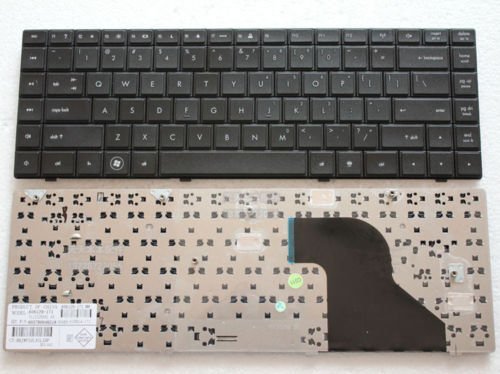
Model Compatibility: HP Compaq 620 series laptops
Layout: Full-size QWERTY with chiclet-style keys
Color: Black
Features: Spill-resistant, durable build, soft-touch keys
Condition: Brand new, OEM standard

Hurry and get discounts on all Apple devices up to 20%
Sale_coupon_15
KSh1,800.00 excl. VAT
Payment Methods:

At Lansotech Solutions, we understand how much you depend on your laptop every day. When the keyboard of your HP Compaq 620 starts acting up—keys not responding, letters missing, or entire sections failing—it can disrupt your work, studies, or personal projects.
The good news? We provide genuine HP Compaq 620 keyboard replacement services in Nairobi CBD, ensuring your laptop is restored to full functionality quickly and professionally.
A malfunctioning keyboard can be frustrating, but replacing it with the right part makes all the difference. The replacement keyboards we offer are OEM‑grade and built to perfectly match the original HP design, guaranteeing:
Smooth and accurate keystrokes.
Perfect alignment and fit.
Long-lasting durability with heavy use.
No guesswork, no cheap imitations—just authentic parts and expert service.
Specifically designed for the HP Compaq 620 series, this keyboard fits flawlessly and integrates with your laptop’s internal components without any modifications.
With a full-size layout and soft-touch keys, typing becomes easy and comfortable—even during extended hours.
Minor spills no longer have to mean disaster. The spill-resistant design offers extra protection for your laptop’s internal circuitry.
Every replacement keyboard is crafted from high‑quality materials that can endure daily typing, ensuring a longer lifespan.
When searching for laptop keyboard shops in Nairobi CBD, you deserve a team that understands quality and speed. At Lansotech Solutions, we stand out because we provide:
🔧 Genuine HP keyboards only
🔧 Same-day installation services
🔧 Competitive pricing and warranty support
🔧 Expert technicians with years of experience
🔧 Comprehensive after-sales service
We are dedicated to making sure you walk out with a laptop that feels brand new and ready to perform.
Sometimes keyboard issues stem from dust and debris rather than physical damage. If your HP Compaq 620 keyboard is dusty, try these quick steps:
Power off and unplug your laptop.
Turn the laptop upside down and gently shake to loosen particles.
Use compressed air to blow out dust from between the keys.
Wipe gently with a microfiber cloth—avoid any liquids.
If the keyboard still misbehaves, bring it to us for professional cleaning or replacement.
 Laptop Computers
 Desktop Computers
 Desktop peripherals
 Laptop Accessories
 Laptop Components
 Network
 Printers
 Server
 Software
No account yet?
Create an Account






