







 Laptop Computers
 Desktop Computers
 Printers
 Network
 Software
 Laptop Accessories
 Laptop Components
 Office
 Desktop peripherals

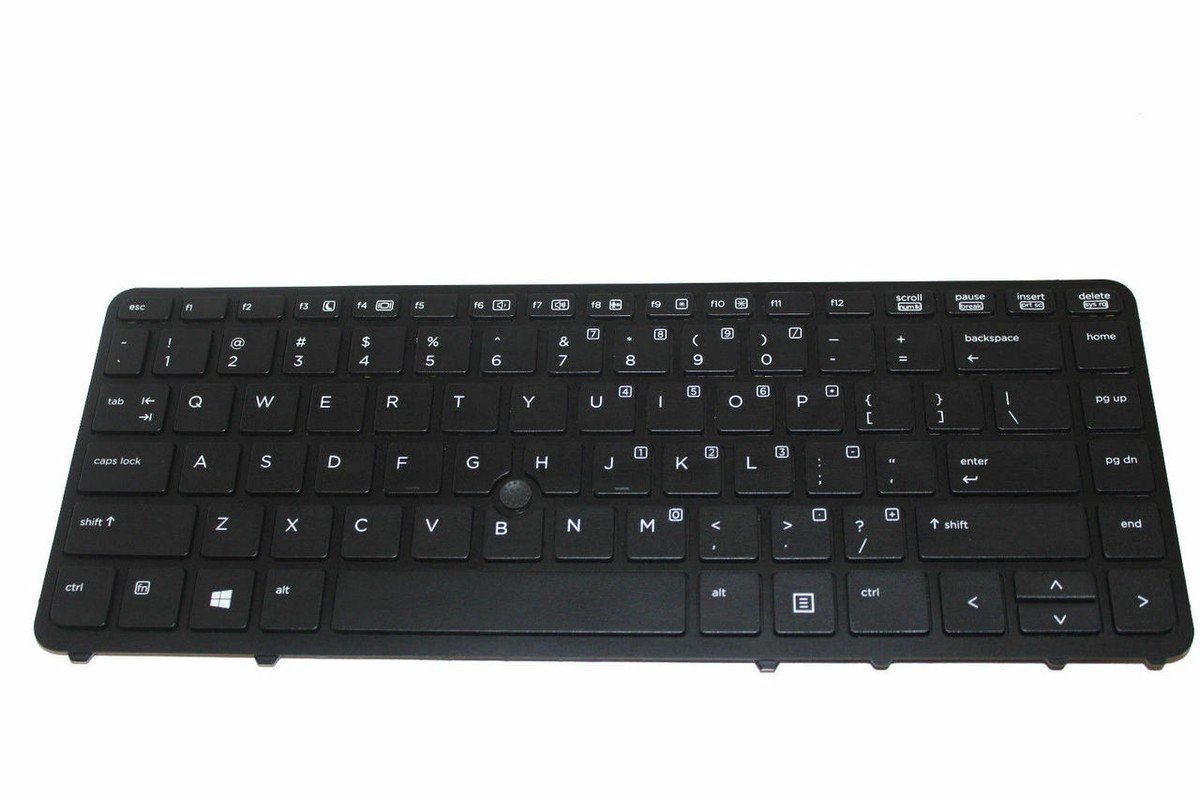
HP EliteBook 840 G1 G2 / 850 G1 G2 / HP ZBook 14 Keyboard Replacement
Layout: US standard layout
Type: Chiclet style, smooth responsive keys
Condition: Brand new, OEM specification
Compatibility: HP EliteBook 840 G1, 840 G2, 850 G1, 850 G2, and HP ZBook 14

Hurry and get discounts on all Apple devices up to 20%
Sale_coupon_15
KSh1,800.00 excl. VAT
Payment Methods:

A keyboard is more than just a set of keys—it’s the gateway to your ideas, your work, and your productivity. When the keyboard on your HP EliteBook 840 G1, 840 G2, 850 G1, 850 G2, or HP ZBook 14 starts to fail—missing letters, unresponsive buttons, or worn‑out keycaps—it can feel like your laptop is losing its voice.
At Lansotech Solutions, we give that voice back with our genuine keyboard replacement services in the heart of Nairobi CBD.
Replacing your keyboard with a genuine part is not just a fix—it’s a restoration. Our HP EliteBook and ZBook replacement keyboards are designed with:
✅ Perfect Compatibility: Engineered specifically for HP EliteBook 840 G1/G2, 850 G1/G2, and HP ZBook 14 models.
✅ Durable Construction: High‑quality keys built to withstand heavy daily use.
✅ Responsive Typing: Enjoy precise keystrokes for smooth, accurate input every time.
✅ Elegant Design: Maintains the sleek, professional look of your laptop.
✅ Optional Backlit Functionality: Ideal for late‑night work or low‑light environments (depending on the specific model you choose).
When you visit Lansotech Solutions, you’re not just buying a keyboard—you’re gaining access to expert services trusted by professionals, students, and businesses across Nairobi.
Here’s why we stand out as one of the most reliable laptop keyboard shops in Nairobi CBD:
🔧 Authentic HP parts for a guaranteed fit
🔧 Fast, professional installation by certified technicians
🔧 Same‑day service available for your convenience
🔧 Warranty and after‑sales support that gives you peace of mind
Once your new keyboard is installed, you might want to add a personal touch. Here’s how to customize a keyboard:
🎨 Use designer keycap stickers to add style and personality.
🛠️ Remap keys using software to create shortcuts tailored to your workflow.
🛡️ Add a slim keyboard cover to keep dust away while enhancing the aesthetic.
Customization not only makes your keyboard unique but also helps protect it, extending its lifespan.
After replacement, follow these tips to keep your HP EliteBook or ZBook keyboard in top shape:
Regularly clean with compressed air to remove debris between keys.
Wipe down gently with a microfiber cloth to maintain shine.
Avoid eating or drinking near your laptop to prevent accidental damage.
Consider a keyboard cover for long‑term protection.
Your HP laptop deserves a keyboard that matches its premium build and your high expectations. At Lansotech Solutions, we make it easy to replace your faulty keyboard with a genuine part that feels just like new—responsive, durable, and elegant.
 Laptop Computers
 Desktop Computers
 Desktop peripherals
 Laptop Accessories
 Laptop Components
 Network
 Printers
 Server
 Software
No account yet?
Create an Account






