











Random Access Memory (RAM) is one of the most important components in any computer system. It directly affects speed, responsiveness, and multitasking ability. Over the years, RAM technology has evolved from DDR2 to DDR3 and beyond, each generation bringing better performance and efficiency.
This article explains the key differences between DDR2 and DDR3 RAM, their history, and why different machines use different types.
A Brief History of DDR2 and DDR3 RAM
DDR2 RAM: The Transitional Standard
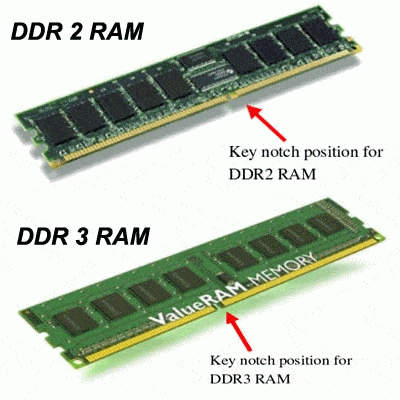
DDR2 SDRAM was introduced around 2003 as an improvement over DDR1 memory. It became widely used in computers between 2004 and 2009.
It was designed to:
- Improve data transfer rates over DDR1
- Reduce power consumption slightly
- Support more stable performance in mid-range PCs
DDR2 became the backbone of many office computers, early laptops, and legacy systems.
DDR3 RAM: The Performance Upgrade
DDR3 RAM arrived in 2007 and gained popularity around 2010. It represented a major leap forward in memory technology.
Its goals included:
- Higher bandwidth and faster speeds
- Lower voltage and better energy efficiency
- Improved support for modern CPUs and applications
DDR3 became the standard for most systems from 2010 to the mid-2010s and is still widely used in older machines today . https://lansotechsolutions.co.ke/product-category/laptop-components/memory/laptop-memory/
Key Differences Between DDR2 and DDR3 RAM
1. Speed and Performance
- DDR2: 400–1066 MT/s
- DDR3: 800–2133 MT/s+
DDR3 is significantly faster, allowing smoother multitasking and better system responsiveness.
2. Power Efficiency
- DDR2 uses ~1.8V
- DDR3 uses ~1.5V (or lower)
DDR3 generates less heat and improves battery life in laptops.3. Architecture Improvements
DDR3 introduced:
- Higher prefetch buffer (8-bit vs 4-bit in DDR2)
- Better data handling efficiency
- Higher memory densities
This makes DDR3 more suitable for modern workloads.
4. Latency vs Bandwidth
- DDR2 has slightly lower latency
- DDR3 has higher bandwidth, which results in better real-world performance
5. Compatibility
DDR2 and DDR3 are physically and electrically incompatible:
- Different slot designs
- Different voltage requirements
- Cannot be interchanged
Why Some Machines Use DDR2 and Others Use DDR3
1. Motherboard Design
Each motherboard is built for a specific RAM type. A DDR2 board cannot support DDR3.
2. CPU Memory Controller
The CPU determines which RAM type is supported. Older CPUs support DDR2, while newer ones support DDR3.
3. Cost and Market Era
DDR2 systems were cheaper and used in older machines, while DDR3 was introduced for higher-performance systems.
4. Usage Requirements
DDR3: Multitasking, gaming (for its generation), modern workloads
DDR2: Basic computing, legacy systems























 ASUS
ASUS



