








 Laptop Computers
 Desktop Computers
 Printers
 Network
 Software
 Laptop Accessories
 Laptop Components
 Office
 Desktop peripherals
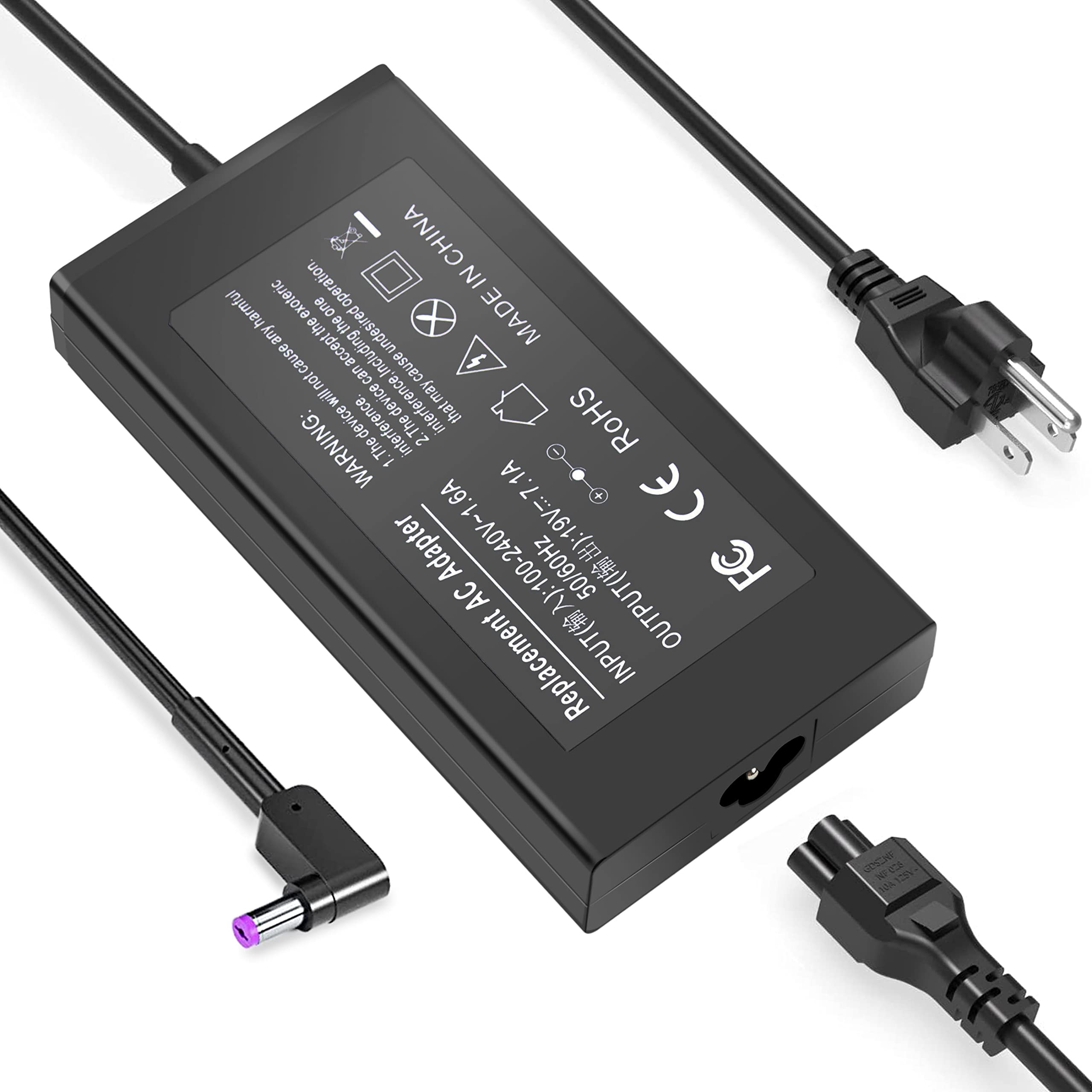
Power Rating: 180W (19.5V, 9.23A)
Input Voltage: 100-240V AC, 50-60Hz
Connector Type: 5.5mm x 1.7mm Barrel Plug
Cable Length: 1.5M (approx.)
Build Quality: High-strength cable, heat-resistant adapter casing
Condition: Brand New
Warranty: 6 Months
Compatibility: Fully compatible with Acer Nitro 5 series and other high-wattage Acer laptops
Package Includes: 1x AC Adapter, 1x Power Cable
Availability: In stock at Lansotech Solutions, Nairobi

Hurry and get discounts on all Apple devices up to 20%
Sale_coupon_15
KSh4,999.00 excl. VAT
Payment Methods:

If you own the Acer Nitro 5 AN515-55, you already know it’s a powerful gaming laptop designed for performance, speed, and durability. To keep such a device running at its peak, you need an original Acer Nitro 5 charger — not just any generic replacement. At Lansotech Solutions, we specialize in offering authentic laptop chargers in Nairobi, and we’re proud to be one of the best laptop charger shops in Nairobi.
The Acer Nitro 5 AN515-55 is a gaming beast equipped with high-end processors, powerful GPUs, and fast SSDs. Due to its intensive power requirements, it demands a high-capacity charger that can keep up with long gaming sessions or heavy productivity tasks.
Output Voltage: 19.5V
Current: 9.23A
Power Rating: 180W
Connector Size: 5.5mm x 1.7mm
Input: 100-240V ~ 50/60Hz
Using a lower-wattage charger may not only lead to slower charging but can also damage your battery or motherboard over time.
At Lansotech Solutions, we understand that gamers and professionals can’t afford downtime. That’s why we ensure:
100% Original Acer Chargers
Warranty-backed products
Same-day delivery in Nairobi
Expert technical advice from certified technicians
Fast installation and testing services
Affordable pricing with no compromise on quality
We are widely rated among the best laptop charger providers in Nairobi, serving hundreds of happy clients across Kenya.
Our original Acer Nitro 5 AN515-55 chargers are designed to meet the specific needs of high-performance laptops. Here’s what makes our chargers stand out:
The 180W adapter delivers stable power supply required for intensive tasks like gaming, 3D rendering, and video editing.
Built-in safety systems prevent power surges, over-voltage, and overheating.
Thick, high-quality cables and a durable plastic housing ensure that your charger withstands daily wear and tear.
All our Nitro 5 chargers are tested for perfect fit and voltage matching, ensuring seamless charging.
Many Nitro 5 users face charging issues, especially after prolonged usage or using substandard chargers. Some of the common problems we help fix include:
Laptop doesn’t charge or power on
Charger gets unusually hot
Battery drains even when plugged in
Loose charger port connection
Slow charging or intermittent power supply
If you’re experiencing any of the above, visit Lansotech Solutions for a fast diagnosis and original charger replacement.
Fake chargers often look similar to the original but lack critical safety components. Using one could fry your motherboard, damage the battery, or even pose a fire hazard.
Here’s how to spot a fake Acer Nitro 5 charger:
Inconsistent labeling or branding
Incorrect voltage or amperage
No warranty or receipt provided
Cheap materials that overheat quickly
Loose connector that doesn’t sit firmly in the port
Lansotech Solutions only stocks genuine and OEM-certified Acer chargers, thoroughly tested by our expert technicians.
Looking for a laptop charger shop in Nairobi with both quality products and expert service? Look no further than Lansotech Solutions. Whether you walk into our physical store or shop online, you’ll get:
Original Acer Nitro 5 AN515-55 Charger
Expert guidance from experienced technicians
Warranty and free consultation
Fast delivery across Nairobi and Kenya
To ensure you don’t need a replacement anytime soon, follow these maintenance tips:
Avoid wrapping the charger too tightly
Unplug from the wall before unplugging from your laptop
Store the charger in a cool, dry place
Don’t use the charger on soft surfaces that retain heat
Use a surge protector to prevent damage from power spikes
 Laptop Computers
 Desktop Computers
 Desktop peripherals
 Laptop Accessories
 Laptop Components
 Network
 Printers
 Server
 Software
No account yet?
Create an Account






