














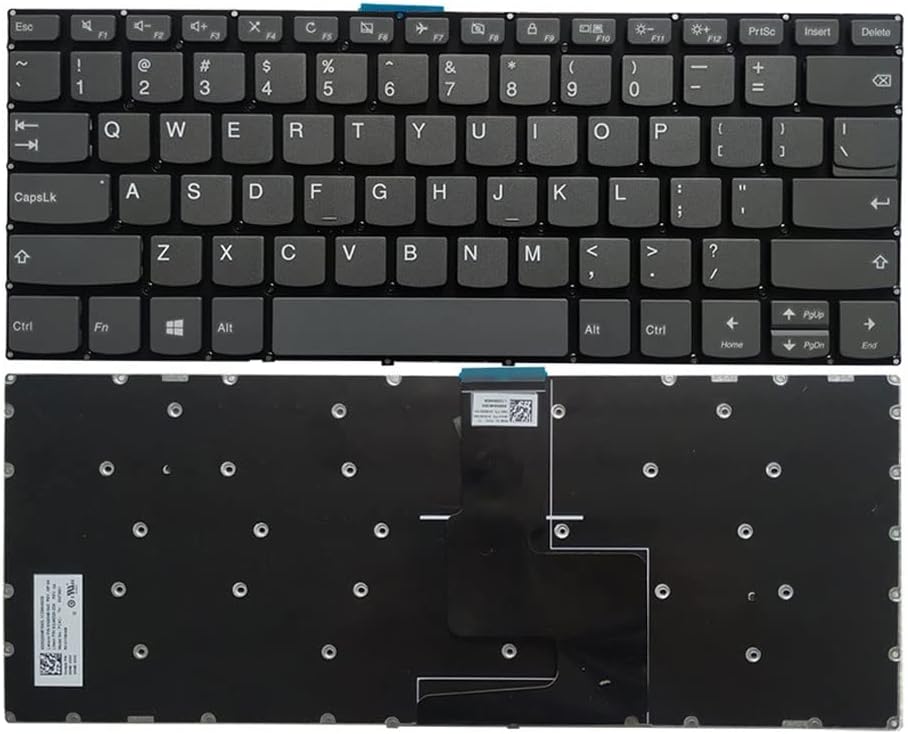


Lenovo IdeaPad 3 14ADA05 Keyboard Replacement – Detailed Technical Guide
At Lansotech Solutions, we specialize in providing genuine Lenovo keyboards and expert installation services. As one of the best laptop keyboard shops in Nairobi CBD, we ensure that your keyboard replacement is handled with utmost precision. If your Lenovo IdeaPad 3 14ADA05 keyboard is malfunctioning, missing keys, or physically damaged, here is an in‑depth technical guide for replacing it properly.
Compatible Models
This keyboard is engineered for:
Lenovo IdeaPad 3 14ADA05
It also fits select models within the 14‑inch IdeaPad 3 series. Always verify the part number and layout before purchasing.
Technical Specifications of Lenovo IdeaPad 3 14ADA05 Keyboard
Keyboard Layout: Compact island‑style chiclet keyboard (without a separate numeric keypad)
Key Mechanism: High‑quality scissor-switch keys designed for durability and responsive typing
Key Travel Distance: Approximately 1.3 mm with consistent tactile feedback
Backlight: Standard version is non‑backlit
Interface: Flat Flexible Cable (FFC) with ZIF (Zero Insertion Force) locking system
Mounting Style: Integrated into the top case/palmrest, secured with screws and plastic melt rivets
Special Features: Spill‑resistant membrane layer, full Fn key support, and media shortcut integration
Required Tools and Parts
Original Lenovo IdeaPad 3 14ADA05 keyboard (OEM part)
Precision Phillips screwdrivers (#0/#00)
Torx T5 screwdriver
Plastic pry tools / opening picks
Tweezers for handling ribbon cables
Anti‑static wrist strap for ESD protection
Step‑by‑Step Keyboard Replacement Procedure
1. Power Off and Prepare
Shut down the laptop completely and unplug the charger.
Disconnect any peripherals and press the power button for 10 seconds to drain residual power.
2. Remove the Bottom Cover
Place the laptop upside down on a soft surface.
Use a T5 screwdriver to remove all screws from the bottom panel.
Gently pry the edges with a plastic spudger to release the clips and lift off the cover.
3. Disconnect the Battery
Locate the battery connector on the motherboard.
Carefully unplug the battery to prevent electrical damage.
4. Access the Keyboard Assembly
Trace the keyboard ribbon cable leading to the motherboard.
Unlock the ZIF connector latch and slide out the cable gently.
5. Remove the Old Keyboard
From the inside of the top case, remove securing screws and detach plastic rivets holding the keyboard.
Push the keyboard outward from inside the frame, taking care not to bend the palmrest.
6. Install the New Keyboard
Place the new Lenovo IdeaPad 3 14ADA05 keyboard into position.
Secure it with screws and ensure proper alignment of clips.
Reinsert the ribbon cable into the ZIF connector and lock it.
7. Reassemble and Test
Reconnect the battery to the motherboard.
Reattach the bottom cover and tighten all screws.
Power on the laptop and test every key, ensuring full functionality and proper responsiveness.
Why Choose Lansotech Solutions
We supply authentic Lenovo replacement keyboards with warranty.
Our technicians follow strict ESD-safe procedures for delicate components.
Fast service and after-sales support guaranteed.
Recognized as one of the best laptop keyboard shops in Nairobi CBD for genuine spares and expert repair services.
















