






 Laptop Computers
 Desktop Computers
 Printers
 Network
 Software
 Laptop Accessories
 Laptop Components
 Office
 Desktop peripherals

Hurry and get discounts on all Apple devices up to 20%
Sale_coupon_15
KSh24,000.00 excl. VAT
Payment Methods:

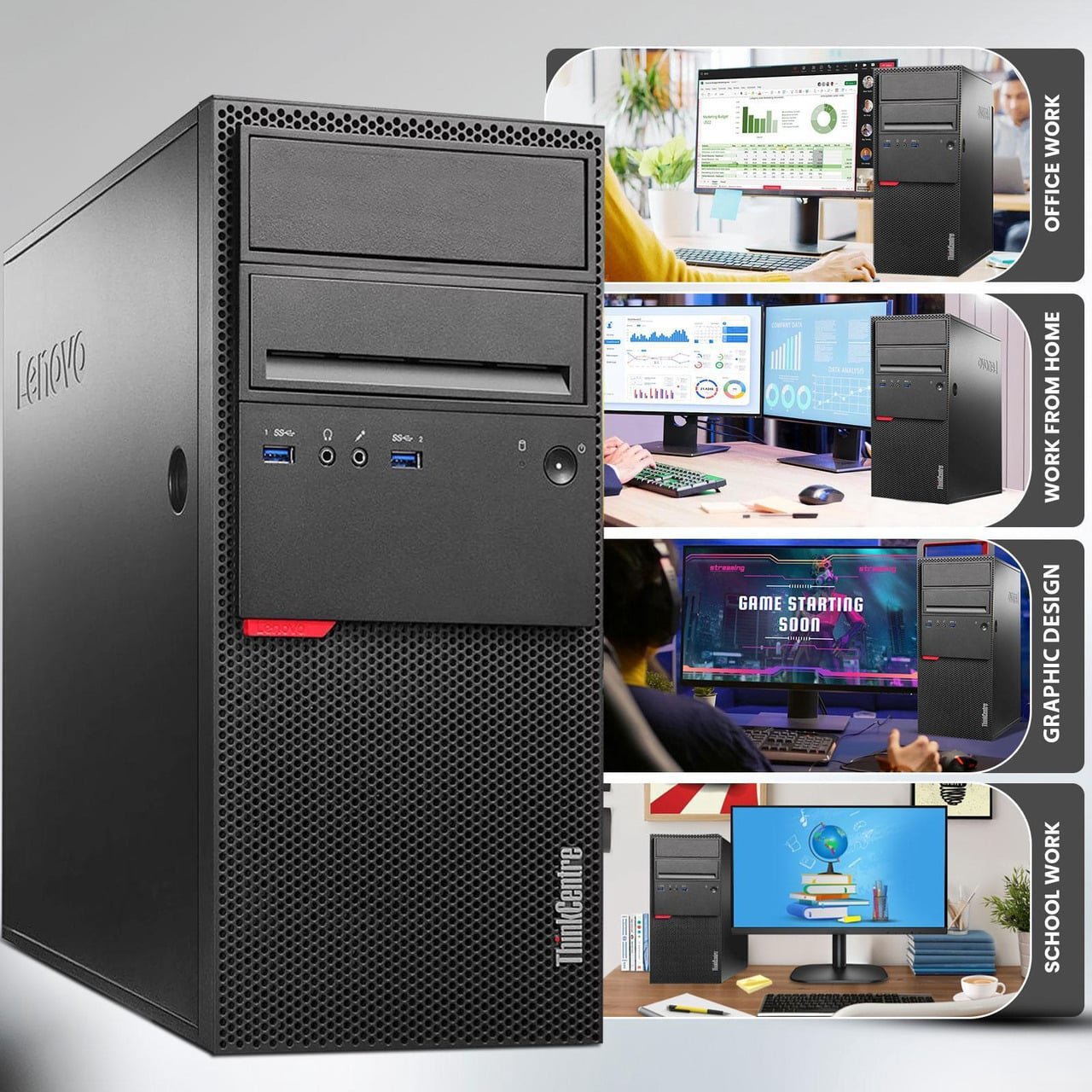
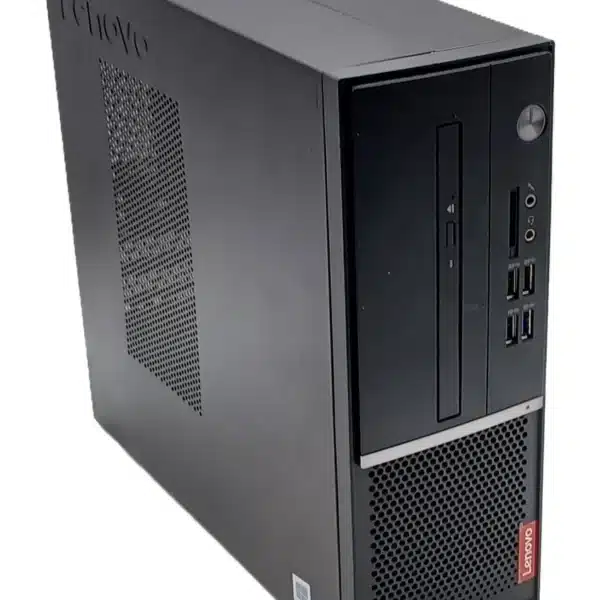
Looking for a reliable Lenovo desktop computer in Kenya for business, office work, school, or everyday computing? The Lenovo ThinkCentre M700 Intel Core i5-6500 Desktop Tower with 16GB RAM and 512GB SSD is a practical desktop solution for users who need dependable performance, responsive storage, and a professional workstation for everyday productivity.
At Lansotech, we understand the importance of choosing a desktop computer that supports your daily operations without unnecessary complexity. Whether you are equipping an office, setting up a workstation, managing business applications, or looking for a desktop for home use, the Lenovo ThinkCentre M700 offers a compact business-oriented platform with a capable Intel Core processor, generous memory, and solid-state storage.
With its Intel Core i5-6500 processor, 16GB RAM, and 512GB SSD, this desktop is suited to multitasking, document preparation, web browsing, spreadsheets, email, online meetings, and many common business applications. Its tower design also provides a practical foundation for a traditional desktop setup with a compatible monitor, keyboard, mouse, and other peripherals.
Choosing the right desktop computer involves more than comparing processor names. Businesses and individual users need a computer that fits their workload, supports their preferred software, and offers a practical balance of performance and value.
The Lenovo ThinkCentre M700 desktop tower is designed around the needs of business computing. Its Intel Core i5 processor supports everyday productivity, while the 16GB memory configuration provides room to run several applications simultaneously. The 512GB solid-state drive helps reduce waiting times when starting the computer, opening applications, and accessing stored files.
For customers shopping for a desktop computer in Kenya, this configuration offers a practical option for offices, educational environments, reception desks, administrative departments, and home workstations.
At Lansotech, we aim to help customers identify computer solutions that match their actual requirements. The Lenovo ThinkCentre M700 is worth considering when your priorities include dependable everyday computing, responsive storage, and a familiar desktop working environment.
The Intel Core i5-6500 processor is a sixth-generation Intel Core desktop CPU with four cores and four threads. It operates at a base frequency of 3.2GHz and can reach a maximum turbo frequency of 3.6GHz under supported conditions.
This processor is suitable for many everyday computing tasks, including preparing business documents, working with spreadsheets, browsing websites, handling email, and running compatible office software.
For businesses, processor performance matters because it affects how comfortably a computer handles routine workloads. A computer used for invoicing, inventory records, customer management, word processing, and web-based applications needs a processor capable of managing these activities efficiently.
The ThinkCentre M700 provides a practical platform for these types of workloads. It is important to match expectations to the age of the processor, however. The Core i5-6500 is an older desktop CPU and is not intended to compete with current-generation processors in demanding professional workloads.
For everyday office productivity and general desktop use, it can remain a useful option when the computer is properly configured and the software requirements are compatible.
Memory plays an important role in desktop performance, particularly when several programs and browser tabs are open simultaneously.
The 16GB RAM configuration in this Lenovo ThinkCentre M700 provides a useful amount of memory for common productivity workloads. Users can switch between spreadsheets, documents, email, browser tabs, and business applications without relying as heavily on storage to compensate for limited memory.
This capacity is particularly useful for:
Actual performance depends on the applications being used, the operating system, and the overall condition of the computer.
For customers comparing desktop computers, 16GB RAM is a useful feature to prioritize when multitasking is important. It offers more flexibility than many basic memory configurations and can help extend the usefulness of a desktop for ordinary office tasks.
Storage has a significant effect on how responsive a computer feels during everyday use. The Lenovo ThinkCentre M700 configuration includes a 512GB solid-state drive (SSD), which uses flash memory rather than the moving mechanical components found in traditional hard disk drives.
An SSD can provide faster startup times, quicker application loading, and more responsive file access than a comparable mechanical hard drive.
With 512GB of storage, users have room for operating system files, office applications, documents, spreadsheets, presentations, downloaded resources, and other everyday work files. The amount of usable space will be lower than the advertised capacity after formatting and installing the operating system and applications.
The SSD is particularly beneficial for business users who frequently switch between programs and need quick access to their work.
For example, an administrative employee can start the computer, open a spreadsheet, review correspondence, and access business documents without the longer storage-related delays associated with many older hard-drive-based systems.
Customers should note that the precise SSD interface and upgrade options can depend on the unit’s configuration. These details should be confirmed before purchasing if a particular storage interface or future upgrade is essential.
The Lenovo ThinkCentre M700 belongs to Lenovo’s business desktop family. ThinkCentre computers are associated with professional environments where users need conventional desktop functionality for daily operations.
This makes the M700 a potential choice for organizations setting up workstations for routine administrative and operational duties.
Small businesses often require computers for preparing quotations, managing invoices, communicating with customers, maintaining records, and using web-based business systems.
The ThinkCentre M700’s processor, memory, and SSD configuration can support many of these activities when the relevant applications are compatible.
For businesses purchasing several computers, a consistent desktop configuration can also simplify workstation setup, peripheral selection, and routine IT support.
Administrative departments rely on documents, spreadsheets, email, databases, and other productivity tools. The 16GB RAM configuration provides room for everyday multitasking, while the SSD supports responsive access to frequently used files and applications.
The tower form factor is appropriate for conventional desk setups and may be convenient for organizations that prefer desktop computers over laptops.
Schools, training centres, and learning facilities can consider this desktop for compatible office applications, research, educational platforms, and general computer-based learning.
Before deployment, institutions should verify the operating system, software requirements, network compatibility, and any specific educational application requirements.
The Lenovo ThinkCentre M700 can also suit users who need a dedicated computer for home administration, research, online services, writing, and other everyday tasks.
A desktop configuration is especially practical when portability is not required and the user prefers a fixed workstation with a separate monitor and keyboard.
The Intel Core i5-6500 includes Intel HD Graphics 530 integrated graphics. This graphics solution supports common display and multimedia tasks when the computer’s configuration, drivers, and connected display are compatible.
It can be suitable for office applications, video playback, web browsing, presentations, and general desktop use.
However, integrated graphics should not be confused with a dedicated gaming or professional graphics card. Users planning demanding modern games, advanced 3D rendering, or GPU-intensive creative work should evaluate a system with graphics hardware designed for those workloads.
Display outputs can vary by system configuration, so customers should confirm the available ports and their compatibility with the intended monitor before purchasing.
A desktop computer’s usefulness also depends on its ability to connect to the devices required for daily work.
The ThinkCentre M700 product family can offer a range of connectivity options, depending on the exact model and configuration. These may include USB ports, display connections, audio connections, and wired networking.
USB connectivity can support compatible keyboards, mice, printers, external storage devices, and other peripherals. A supported network connection can enable access to business systems, shared files, and internet services.
Because port availability may differ between individual units, customers should verify the physical connections on the specific computer being supplied.
It is also important to check whether a monitor, keyboard, mouse, Wi-Fi adapter, or other accessories are included in the purchase. These items should not be assumed to come with the desktop unless the product listing explicitly states so.
The answer depends on the software, operating system, and security requirements of the organization.
For compatible applications such as office productivity software, browser-based services, document management tools, and routine administrative programs, the hardware configuration may provide adequate performance.
However, the Intel Core i5-6500 is an older processor, and buyers should carefully consider operating system support before deploying the computer in a new business environment.
In particular, the Intel Core i5-6500 is not on Microsoft’s supported processor list for Windows 11. Buyers should not assume that a standard, officially supported Windows 11 installation will be available simply because the computer has 16GB RAM and an SSD.
Windows 10 reached the end of standard support on 14 October 2025. Organizations planning to use this desktop should therefore establish a suitable, supported operating system strategy before purchasing or deploying it. Depending on the circumstances, this may involve an eligible alternative operating system or a separately verified support arrangement.
For business customers, operating system compatibility and security updates are essential considerations. A computer that performs well for basic tasks must still meet the organization’s security and software support requirements.
Before choosing the Lenovo ThinkCentre M700 desktop tower, consider the following practical factors.
Verify that the supplied unit includes the advertised Intel Core i5-6500 processor, 16GB RAM, and 512GB SSD. Where applicable, confirm the memory arrangement and storage type.
Establish whether the computer is supplied with an operating system and verify that the installed version is appropriately licensed and supported for your intended use.
If the unit is refurbished or previously used, review its condition, testing status, warranty coverage, and the seller’s return policy. The actual condition should be stated clearly in the product listing.
Check the available display outputs, USB connections, network interfaces, and other ports against the peripherals you intend to use.
The computer is most appropriate for everyday productivity and compatible business applications. Users requiring advanced gaming, intensive video editing, complex 3D work, or demanding computational applications should evaluate more modern hardware.
These checks help ensure that the selected desktop meets your needs and reduces the risk of compatibility surprises after purchase.
Yes, the configuration can suit many routine office tasks, including document preparation, spreadsheets, email, browsing, and compatible business applications. Performance depends on the software, operating system, and condition of the computer.
The configuration described in this listing includes 16GB RAM. Buyers should verify the supplied unit’s specifications before purchase.
A 512GB SSD can accommodate an operating system, applications, documents, spreadsheets, and many everyday work files. Storage needs vary, so users with large media libraries or extensive data archives may require additional storage.
The Intel Core i5-6500 is not officially listed as a supported Windows 11 processor. Buyers should verify current Microsoft requirements and choose an appropriate operating system before deploying the computer.
It can handle some older or lightweight games that are compatible with its hardware, but Intel HD Graphics 530 is not intended for demanding modern games. Gaming performance depends on the title, settings, drivers, and system configuration.
A monitor should not be assumed to be included. Check the Lansotech product listing or confirm the package contents before placing an order.
It can be suitable for many routine small-business tasks, provided that its operating system, software compatibility, security requirements, and physical condition meet the business’s needs.
The Lenovo ThinkCentre M700 Intel Core i5-6500 desktop tower with 16GB RAM and 512GB SSD is a practical option to consider for everyday desktop computing, office productivity, and compatible business applications.
Its quad-core Intel Core i5 processor supports routine workloads, 16GB RAM provides useful multitasking capacity, and the 512GB SSD offers responsive storage for applications and documents.
For customers shopping for a Lenovo desktop computer in Kenya, the most important considerations are to verify the exact configuration, confirm the unit’s condition, check included accessories, and establish an operating system that meets current security and support requirements.
At Lansotech, we recommend matching the desktop to your specific workload and verifying the product details before purchasing. With the right configuration and software environment, the ThinkCentre M700 can serve as a functional desktop platform for everyday productivity.
No account yet?
Create an Account







 ASUS
ASUS






